The best TV wall mount for turning a screen sideways is a full-motion model with an articulating arm and enough swivel range for your room. The NSY Audio mount is the clearest fit for turning a larger TV up to 90 degrees, while Suptek and D-Line suit smaller screens. EVERVIEW offers broad screen-size and VESA coverage. HangSmart is an installation-focused option, but its listed features do not specify swivel or tilt.
| Mount | Best for | Key movement or feature |
|---|---|---|
| NSY Audio | Large TVs and wide movement | Up to 180° swivel; 28-inch extension |
| Suptek MA2720 | Small TVs and monitors | 180° swivel; 360° rotation |
| D-Line | Small screens needing extension | Up to 90° turn |
| EVERVIEW | 13–42-inch screens | Swivel, tilt, and 360° rotation |
| HangSmart TV | No-stud installation | Movement details not specified |
NSY Audio Recessed Full-Motion TV Mount
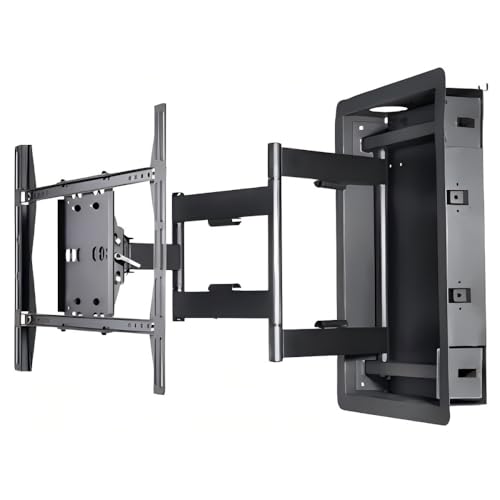
Best for: Owners of 32–90-inch TVs who need a large range of movement, including a sideways viewing position. Its listed features specifically say the 28-inch extension and swivel up to 180 degrees can allow a 55-inch TV to turn 90 degrees without hitting the wall.
The recessed design is intended to sit between standard 16-inch studs and keep the display close to the wall when retracted. The mount supports TVs up to 135 pounds and listed VESA patterns from 200×200 to 800×600. It also includes cable management and ±15-degree tilt.
Limitation: This is a large-TV mount with installation requirements involving a recessed wall space. Check the TV’s VESA pattern, weight, and wall layout before choosing it.
Suptek MA2720 Swivel And Tilt Mount
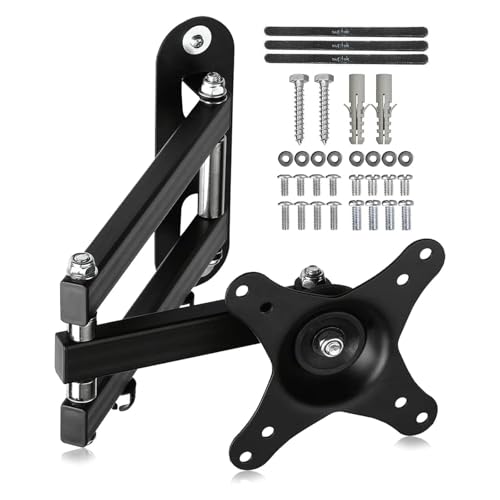
Best for: Small TVs and monitors from 15 to 32 inches, weighing up to 13 kilograms. This model is selected for its stated 180-degree swivel and 360-degree rotation, which offer more positioning options than a fixed bracket.
It fits VESA 75x75mm and 100x100mm patterns and extends up to 380mm from the wall. The listed tilt range is ±20 degrees. Choose this mount if you need to angle a compact screen toward different seats or rotate it after installation.
Limitation: Its screen-size and weight limits make it unsuitable for larger or heavier TVs. Confirm both VESA pattern and weight before purchase.
D-Line Full-Motion Monitor Wall Bracket

Best for: 13–27-inch screens that need to turn toward a nearby seating area. The mount specifies a turn range of up to 90 degrees in either direction, ±15-degree tilt, and extension from 1.9 to 15.4 inches.
Its three-arm design is intended to provide smooth movement. It supports VESA 75x75mm and 100x100mm patterns and screens up to 55 pounds. Choose it if the screen is small enough for its stated range and you want clear, specified side-to-side movement.
Limitation: It is limited to screens no larger than 27 inches. The manufacturer advises checking VESA compatibility before purchase.
EVERVIEW Full-Motion TV Monitor Mount

Best for: Many 13–42-inch flat or curved screens weighing up to 44 pounds. Its listed VESA patterns include 75×75, 100×100, 200×100, and 200x200mm, making it a flexible option across several smaller screen sizes.
The mount swivels toward different seats, tilts up 5 degrees and down 15 degrees, and extends up to 14.5 inches from the wall. It also lists 360-degree rotation as a post-installation adjustment for leveling. Choose it if you need adjustable viewing and your wall type meets its stated limits.
Limitation: The product information specifies installation only on concrete or brick walls, or a single wood stud. Maximum swivel depends on screen size.
HangSmart TV No-Stud Wall Mount

Best for: Buyers whose priority is a DIY no-stud mounting approach. The listed features describe support for TVs up to 100 inches and 150 pounds, as well as broad compatibility with flat or curved screens.
This mount may suit renters or homeowners seeking an alternative to a stud-based installation. However, its supplied feature information does not state a swivel, tilt, or extension range. Choose it for the installation approach only after confirming whether the screen can turn sideways as needed.
Limitation: Side-to-side movement is not specified in the product details, so it is not the strongest choice when turning the TV is essential.
Buying Guide: How To Choose A TV Mount That Turns
Do you mean swivel or screen rotation?
Swivel turns the mounted TV left or right toward another viewing position. Rotation turns the screen within its mounting orientation, which may be useful for leveling or changing orientation. Product descriptions can use these terms differently, so check the stated movement range and instructions before buying. If you need a TV to face a side seating area, prioritize a mount that explicitly lists swivel.
How much movement does your room need?
Measure the distance from the mounting point to the viewing area and note nearby walls, cabinets, and doorways. A longer extension can help a screen clear a wall or reach around an obstruction, while the swivel range determines how far it can turn. The NSY Audio mount lists the greatest extension here at 28 inches. D-Line specifies a turn range up to 90 degrees each way for smaller displays.
What should you check before installation?
- Screen size and weight: Stay within the mount’s stated limits.
- VESA pattern: Match the TV’s mounting-hole spacing to the bracket.
- Wall type: Verify the mount is specified for your wall material and structure.
- Clearance: Check that the TV can extend and turn without hitting walls or furniture.
- Cables and inputs: Consider whether movement could strain connected cables or block ports.
Frequently Asked Questions
Can a TV wall mount turn a TV sideways?
Yes. Choose a full-motion mount with a stated swivel range and enough extension for the screen to clear nearby walls or furniture.
Which listed mount specifically describes turning a TV 90 degrees?
The NSY Audio mount says its 28-inch extension and swivel up to 180 degrees can allow a 55-inch TV to turn 90 degrees.
Does a fixed wall mount turn sideways?
No. A fixed mount holds the TV in one position. Choose a swivel or full-motion model if you need to change the viewing direction.
How do I know if a mount fits my TV?
Compare the TV’s screen size, weight, and VESA pattern with the mount’s listed specifications. Also check the wall type and installation requirements.
Is a 360-degree rotation rating the same as swivel?
Not necessarily. Rotation and swivel may describe different adjustments. Check the product’s movement description and confirm it provides the specific left-right turn your room requires.