The best low-profile TV wall mount depends on screen size, wall type, and whether you need a fixed position or adjustable viewing. For a simple fixed installation, the SANUS sits 1 inch from the wall, while the PERLESMITH and USX MOUNT suit smaller TVs. The Amazon Basics mount supports larger screens, and the monTEK adds full motion while retracting to 1.1 inches. Check your TV’s VESA pattern, weight, and installation surface before choosing.
| Mount | Best for | Listed TV size | Wall clearance or movement |
|---|---|---|---|
| Amazon Basics | Large TVs and multiple wall types | 37–86 inches | Low-profile; fixed |
| PERLESMITH | Smaller fixed installations | 26–60 inches | 1.18 inches; fixed |
| USX MOUNT | Smaller TVs with pull straps | 26–55 inches in title | Up to 1.3 inches; fixed |
| monTEK | Large screens needing adjustment | 43–90 inches | 1.1 inches; full motion |
| SANUS | Fixed mounting with minimal gap | 40–80 inches | 1 inch; fixed |
Amazon Basics Low-Profile TV Wall Mount

This Amazon Basics mount is best for buyers installing a larger TV on a compatible wall. Its listed range is 37 to 86 inches, with a maximum TV weight of 150 pounds. The product information specifies concrete, brick, and wood-stud walls, including 16- and 24-inch stud spacing.
It is a useful choice when screen size and installation-surface flexibility matter more than swivel or tilt adjustment. The listing highlights horizontal post installation leveling. Check the mount’s installation details and your TV’s requirements before drilling; its large size range does not mean every TV will fit.
PERLESMITH Ultra Slim Fixed TV Mount

The PERLESMITH is best for a fixed, close-to-wall installation with a compatible 26- to 60-inch TV. It supports TVs up to 115 pounds and sits 1.18 inches from the wall. Listed VESA patterns range from 75 x 75 mm through 400 x 400 mm, including several sizes in between.
Bottom safety screws are designed to help prevent the TV from moving on the mount. Choose this model if a slim appearance and broad listed VESA coverage are priorities. The product information says to refer to another mount model if wood-stud spacing exceeds 16 inches, so confirm stud spacing before purchase.
USX MOUNT Fixed Low-Profile Bracket

This fixed USX MOUNT bracket is best for buyers who want a straightforward, space-saving option for a smaller flat-screen TV. The product title gives a 26- to 55-inch range, while its feature text says it fits most 26- to 60-inch TVs. It lists support up to 99 pounds and VESA patterns from 75 x 75 mm to 400 x 400 mm.
The bracket can place a TV up to 1.3 inches from the wall, and pulling straps help lock and release the TV. Check the product’s size range and your TV specifications carefully because the title and feature text differ. Concrete anchors are not included in the package according to the listing; do not use the mount on drywall alone.
monTEK Ultra-Slim Full-Motion TV Mount

The monTEK is best for buyers who want a low-profile mount but also need to angle the screen. It is listed for 43- to 90-inch TVs up to 132 pounds, with VESA patterns from 100 x 200 mm to 600 x 400 mm. It retracts to 1.1 inches from the wall, extends up to 16.5 inches, swivels up to 60 degrees in either direction, and tilts from +3 to -12 degrees.
It also includes a cable-management strap and allows post-installation leveling by 3 degrees. Choose it over a fixed mount when viewing angles need adjustment. It requires a suitable wood-stud, concrete, or brick installation; the listing specifically says not to install it on drywall alone. Maximum rotation depends on screen size.
SANUS Fixed TV Wall Mount
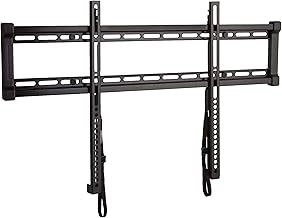
The SANUS is best for buyers who want a fixed TV position and a particularly narrow wall gap. It is listed for 40- to 80-inch TVs up to 130 pounds and places the screen 1 inch from the wall. The mount accommodates both 16- and 24-inch studs, and the listing identifies it as UL Listed.
Quick-release straps are designed to make TV removal and cable access easier without tools. This option is a better fit for a planned viewing position than for a room where the screen needs to swivel or tilt. Confirm that the TV’s mounting pattern and weight fall within the product’s specifications.
Buying Guide: How to Choose a Low-Profile TV Mount
Will the mount fit your TV?
Compare the TV’s screen size and weight with the mount’s listed limits. Then check the VESA pattern: this is the spacing between the mounting holes on the back of the TV, measured in millimeters. A mount’s advertised screen-size range alone does not confirm compatibility.
How close should the TV sit to the wall?
Look for the stated wall clearance if a nearly flush appearance is important. In this selection, the SANUS lists a 1-inch gap, while the monTEK retracts to 1.1 inches and the PERLESMITH sits 1.18 inches from the wall. A full-motion mount may need to extend away from the wall during adjustment.
Do you need a fixed or moving mount?
A fixed mount is generally the simpler choice when the seating position and screen angle are settled. Choose a full-motion design such as the monTEK if you need to swivel or tilt the TV. Movement can improve viewing flexibility, but the mount’s installed depth and maximum rotation may differ from its retracted position.
What should you check about the wall?
Verify the required wall material and stud spacing before installation. The products list different support for wood studs, concrete, or brick. Do not assume that a mount suitable for one surface can be safely attached to another, and follow the included installation instructions and hardware guidance.
Frequently Asked Questions
What does low-profile mean for a TV wall mount?
A low-profile mount holds the TV close to the wall to reduce the gap and create a more streamlined appearance. Check the specific mount’s stated clearance to compare models.
Is a fixed mount better than a full-motion mount?
A fixed mount suits a TV that will stay in one viewing position. A full-motion mount is better when you need to adjust the screen angle, but its arms can extend farther from the wall.
How do I check whether a mount fits my TV?
Compare the TV’s weight, screen size, and VESA hole pattern with the mount’s listed limits. All three details matter when confirming fit.
Can I mount a TV directly to drywall?
Do not assume drywall alone can support a TV mount. The monTEK listing explicitly prohibits drywall-only installation, and each mount should be installed only on a surface and with hardware supported by its instructions.
Does every low-profile mount allow cable access?
No. Some products list release straps or cable-access features, while others do not specify them. Check the individual mount’s listed features if you expect to remove the TV or reach cables frequently.