The best way to mount a TV on the ceiling is to choose a bracket that matches the TV’s weight, VESA pattern, screen size, and viewing needs. PERLESMITH and WALI are strong options for adjustable fixed-pole setups; TOPSKY and VIVO suit buyers who want a motorized flip-down screen. AX WABER is designed for flexible home or commercial placement.
| Mount | Best For | Key Feature |
|---|---|---|
| PERLESMITH PSCM2 | Adjustable fixed-pole viewing | 360° swivel and up to 110 lb capacity |
| WALI | Sloped or vaulted ceilings | Flip-down tilt and broad ceiling options |
| TOPSKY | Remote-controlled positioning | Motorized 0–80° flip-down |
| VIVO MOUNT-E-FD75C | App and voice control | Motorized height with saved settings |
| AX WABER AX11TB01 | Home or commercial installations | Adjustable pole and 360° swivel |
PERLESMITH Adjustable Ceiling TV Mount
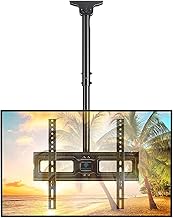
Best for: Viewers who want a fixed-pole mount with broad swivel adjustment. It fits most 26–65-inch TVs with VESA patterns from 100×100 to 400×400 mm and supports up to 110 pounds. The pole places the center of the TV plate 20.47 to 29.92 inches from the ceiling.
The screen tilts from +5° to -15°, swivels 360°, and can be leveled by ±3°. These adjustments make it easier to aim the TV toward different seating positions. It is selected for its combination of height adjustment, swivel, and tilt.
Limitation: This is not a flip-down mount. The listing says not to install it on drywall alone; verify the TV’s weight and VESA pattern before purchase.
WALI Flip-Down Ceiling TV Mount

Best for: Buyers who need a flip-down bracket or a mount suited to flat, sloped, or vaulted ceilings. WALI supports TVs up to 65 inches and 110 pounds, with listed VESA patterns from 100×100 to 400×400 mm. Its height adjusts in two-inch increments, with the mounting plate center 21.4 to 30.3 inches from the ceiling.
The bracket tilts down 25°, swivels 360°, and rotates 3° in either direction for leveling. Its listed ceiling options make it a useful choice when a standard flat-ceiling pole mount is not suitable.
Limitation: Check the TV’s VESA pattern and weight first. The product information warns against mounting on drywall alone.
TOPSKY Motorized Flip-Down Ceiling Mount

Best for: People who want to raise or lower a ceiling-mounted TV by remote. This motorized mount is listed for 32–70-inch TVs up to 88 pounds. Its remote has a stated range of 98 feet, and the screen flips down through an angle of 0–80°.
The mount folds against the ceiling when not in use, which can help preserve wall and floor space in bedrooms, apartments, lofts, and commercial rooms. It also offers ±2° screen leveling.
Limitation: It has no left-to-right swivel function. Buyers who need to turn the screen toward different parts of a room should consider a swivel-style mount instead.
VIVO Electric Flip-Down TV Mount
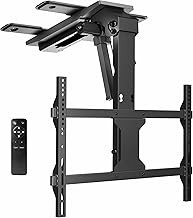
Best for: Buyers who prefer app-based or voice-controlled adjustments. The VIVO mount fits listed screen sizes from 37 to 70 inches and supports a range of VESA patterns, including 200×100 through 600×400 mm. Its RF remote offers two programmable height settings; the product also lists three memory settings.
Users can adjust the mount through the Tuya mobile app or with Amazon Alexa or Google Home. The screen has a manual 0° to -80° tilt range and can be leveled by ±3°.
Limitation: For TVs over 65 inches, the product information says the VESA holes should be centered to provide enough ceiling clearance. Confirm that placement before choosing this mount.
AX WABER Adjustable Pole Ceiling Mount

Best for: Buyers considering a ceiling-mounted TV in a home or commercial setting. The product description highlights use in places such as restaurants, gyms, clinics, patios, and basements. Its adjustable pole extends 20.47 to 29.92 inches from the ceiling to the center of the TV plate.
The mount offers 360° rotation, tilts down 25° and up 5°, and includes an installation template. It is selected for buyers who want a pole-style screen position and adjustable viewing angle in varied spaces.
Limitation: The supplied product details do not specify a maximum TV weight or supported VESA patterns. Confirm those requirements with the product listing before purchase.
Buying Guide: How to Choose a Ceiling TV Mount
Does the mount fit the TV?
Compare the TV’s screen size, weight, and VESA mounting-hole pattern with the mount’s specifications. A mount that appears to fit by screen size may still be unsuitable if the TV’s weight or hole spacing falls outside its listed limits. For AX WABER, verify weight and VESA details because they are not included in the supplied specifications.
Should you choose a pole mount or a flip-down mount?
A pole mount keeps the TV suspended below the ceiling and is useful when you want to swivel the screen around the room. A flip-down mount folds the TV toward the viewing area and can tuck it closer to the ceiling when not in use. TOPSKY and VIVO are motorized flip-down options; TOPSKY specifically has no left-right swivel.
What ceiling structure is required?
Check the mount’s installation instructions and identify a suitable structural attachment point before installation. PERLESMITH and WALI state that they can be mounted to wood studs, concrete, and brick, and warn not to install on drywall alone. Do not assume that a ceiling surface by itself can support the TV and bracket.
How much adjustment do you need?
Consider ceiling height, seating position, glare, and whether multiple viewers need different angles. Compare the listed height range, tilt, swivel, and leveling features. If you want to adjust the screen without reaching it, choose a motorized model; if you need to aim the screen side to side, select a mount that explicitly lists swivel.
Frequently Asked Questions
Can any TV be mounted on the ceiling?
No. The TV must match the mount’s supported screen size, weight capacity, and VESA pattern. Check all three before purchasing.
Can a ceiling TV mount attach to drywall alone?
The PERLESMITH and WALI product details say not to install their mounts on drywall alone. Follow the selected mount’s installation guidance and use an appropriate structural attachment.
What is the difference between a motorized and manual ceiling mount?
A motorized mount uses a remote or connected controls to move the screen. A manual mount relies on the user to position it, where its design allows.
Which option swivels side to side?
PERLESMITH, WALI, and AX WABER list 360° swivel. TOPSKY explicitly does not swivel left to right; VIVO’s supplied details do not list swivel.
How do I reduce glare from a ceiling-mounted TV?
Choose a mount with a tilt range that lets you angle the screen toward viewers and away from reflections. The amount of adjustment varies by model, so compare the listed tilt range with the room layout.