Looking for a ceiling-mounted TV solution that blends safety, reach, and motion? This guide highlights top ceiling mounts ideal for most 26–86 inch TVs. Each option fits common VESA patterns up to 600x400mm and supports substantial weights, with features like full motion, swivel, and height adjustment. The picks are organized for different room needs, from compact living areas to vaulted ceilings, helping you choose the right mount for your setup and viewing preferences. The buyer table summarizes key picks at a glance.
| Product | Mount Type | Best For | Limit |
|---|---|---|---|
| PERLESMITH PSCM2 | Pole ceiling mount; adjustable | Medium to large TVs; standard ceilings | 110 lbs |
| USX STAR Ceiling Mount | Full motion; 360° swivel | Dynamic viewing with wide range of motion | 110 lbs |
| AX WABER AX11TB01 | Pole ceiling mount; adjustable | 4K/LCD/LED panels; modern spaces | 110 lbs |
| Mount-It! MI-509B | Full motion; variable height | Vaulted or tall ceilings; larger screens | 110 lbs |
| VIVO MOUNT-VC86-3 | Full swivel; telescoping pole | Large screens; vaulted ceilings | 132 lbs |
PERLESMITH Ceiling TV Mount PSCM2
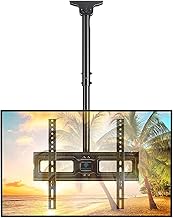
The PSCM2 is a pole-style ceiling mount designed for TVs from 26 to 65 inches with a maximum VESA pattern of 400x400mm and a weight capacity up to 110 pounds. It’s best for rooms with standard or low-profile ceilings where a hanging display needs to be kept above eye level. The design prioritizes a clean, uncluttered look and simple installation. The mount supports tilt and extension ranges typical for ceiling mounts in this category, allowing you to fine-tune viewing height. A potential limitation is that very tall ceiling heights may require longer distance to keep the screen within ergonomic reach.
USX STAR Ceiling TV Mount 26–65 Inch

This model offers full-motion capability with 360° swivel, height adjustment, and a tilt function, supporting TVs up to 110 pounds and 400x400mm VESA. It’s an excellent choice for living rooms or bedrooms where you want flexible camera-like movement for multi-angle viewing. It’s better for spaces requiring dynamic adjustments; avoid if you need a fixed, non-tilting installation or have very tall ceilings where reach is a concern without a ladder.
AX WABER AX11TB01 Ceiling Mount for 26–65 Inch

The AX WABER AX11TB01 is a pole ceiling mount built to hold 26–65 inch LCD/LED/OLED/4K TVs with a 400x400mm max VESA, supporting up to 110 pounds. It’s best for modern media rooms that require a clean ceiling mount solution with reliable tilt and extension options for optimal viewing. The caution here is that mounting on certain vaulted ceilings may require careful alignment to avoid contact with overhead features.
Mount-It! MI-509B Ceiling Mount

The MI-509B supports 32–75 inch TVs up to 110 pounds with full motion, 360-degree rotation, and a height range of 22–36 inches. It is suitable for vaulted ceilings or rooms where you want maximum flexibility in angle and reach. It’s a solid choice when wall mounting is impractical, but ensure there is sufficient ceiling space for the range of motion to avoid obstruction.
VIVO Black TV Ceiling Mount MOUNT-VC86-3

The VIVO MOUNT-VC86-3 is designed for large screens from 43 to 86 inches, offering full swiveling capabilities and telescoping height adjustment via a 3-foot extension pole. It supports up to 132 pounds and is best for vaulted or pitched roofs where extra pole height helps position the display. It’s a good fit for home theaters or large-family spaces; consider a shorter option if you have a lower ceiling height to prevent screen obstruction.
Buying Guide: Key Considerations for Ceiling TV Mounts
- Confirm the mount supports your TV’s size and weight. Most options here cover 26–86 inches and up to 110 pounds, with one model handling up to 132 pounds.
- Check the VESA pattern on your TV (e.g., 400x400mm, 600x400mm). Choose a mount that accommodates your pattern to ensure a proper fit.
- Decide between fixed, tilt-only, or full-motion with swivel. Full-motion mounts provide flexibility for seating distance and multiple viewing angles.
- Pole mounts work well for vaulted or tall ceilings; ensure your ceiling can accommodate the installation and the required clearance.
- Ceiling mounts require robust anchoring. Consider access to joists, ceiling material, and whether you need professional installation.
- Plan for in-ceiling or surface routing to keep cords organized and out of sight.
- A ceiling mount can free up wall space and provide a clean look, especially in small rooms or areas with furniture layout challenges.
Frequently Asked Questions
- What is the best ceiling mount for vaulted ceilings? Look for a pole ceiling mount with tall extension and robust swivel to reach optimal viewing height without obstruction.
- Can ceiling mounts support 4K TVs? Yes, most 26–65 inch ceiling mounts support 4K TVs as long as VESA and weight limits are matched.
- Are ceiling mounts safer than wall mounts? When installed correctly, ceiling mounts provide comparable safety with the added benefit of above-floor placement, reducing accidental bumps.
- Do I need professional installation? If you’re mounting into reinforced ceilings or handling heavy TVs, professional installation ensures proper anchoring and safety.
- How do I route cables through a ceiling mount? Use in-wall cable raceways or a dedicated cable conduit to keep lines neat and compliant with building codes.
- What is VESA compatibility? VESA is the standardized mounting pattern on the back of the TV. Ensure your mount’s VESA range includes your TV’s pattern.