The best smart lock for a screen or patio door depends on the door’s construction: sliding glass doors need a compatible sliding-door lock, while hinged doors may use a mortise lock, deadbolt, or knob. Of these five options, Eseesmart is specifically described for sliding glass and patio doors. Luston targets certain multipoint swing doors, while the other models are general door locks whose fit for a screen door must be confirmed before purchase.
| Product | Best suited for | Key fit consideration |
|---|---|---|
| Eseesmart Sliding Door Lock | Sliding glass or patio doors | Check thickness and door type |
| Luston Slim Smart Lock | Compatible multipoint swing doors | Check mortise dimensions and handle travel |
| Philips WiFi Keypad Deadbolt | Doors designed for a deadbolt and handle | Confirm the door accepts its lock set |
| Biometric Door Knob | Doors that use a standard knob format | Confirm knob preparation and installation fit |
| 3D Face Recognition Lock | Entry doors suited to its lock format | Confirm dimensions and installation requirements |
Eseesmart Sliding Door Lock

Best for: Buyers looking for a keyless lock specifically described for sliding glass, patio, and aluminum alloy doors. Its listed entry methods are fingerprint, passcode, mobile app, RFID card, and backup key. It supports up to 300 users, making it a better fit for households or properties with multiple authorized users.
The product description gives a door-thickness range of 22–120 mm and says the handle is reversible for left- or right-opening doors. It also lists low-battery alerts, an estimated eight-month battery life, and power-bank backup for emergencies.
Limitation: Confirm the door’s thickness and hardware configuration before ordering. A smart lock advertised for sliding patio doors is not automatically compatible with every screen or sliding door.
Luston Slim Smart Lock

Best for: Owners of compatible hinged doors with multipoint locking hardware. The lock offers fingerprint, Bluetooth app, passcode, key fob, mechanical key, Apple Watch, and NFC access. Alexa voice unlocking requires a Wi-Fi gateway, which the product description says is sold separately.
The package includes a 3585 mortise, with listed measurements of 85 mm between upper and lower centers and 35 mm from center to door edge. The brand states that the lock is designed for many multipoint systems, but door fit depends on the existing mortise and handle movement.
Limitation: Check the mortise dimensions and confirm the handle can operate within the stated 45-degree limit. This is a swing-door option, not a listed sliding-door lock.
Philips WiFi Keypad Deadbolt

Best for: Buyers who want remote app control on a door built to accept a deadbolt and handle set. The lock connects directly to 2.4 GHz Wi-Fi without a separate hub. The Philips Home Access app is described as supporting remote lock and unlock, management of user codes and fingerprints, lock-status checks, and access-history monitoring.
Voice-assistant compatibility with Alexa and Google Assistant is also listed. The product description recommends keeping the lock within 33 feet of the router and limiting signal obstacles.
Limitation: This model is a deadbolt lock, not a sliding-door lock. Confirm that the door’s existing preparation and construction suit a deadbolt installation; Wi-Fi performance also depends on router distance and interference.
Biometric Keypad Door Knob
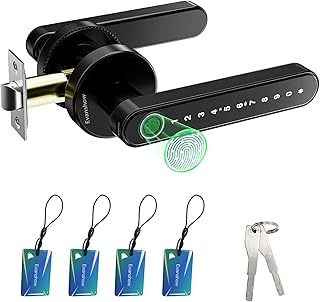
Best for: Buyers whose door uses a compatible knob format and who want several local entry choices. This model combines fingerprint, password, mechanical key, and IC card access. Its listed capacity is up to 100 fingerprints and 50 passwords, and the description says fingerprint recognition takes less than a second.
The product is presented for bedrooms, homes, hotels, offices, and apartments. It may suit a hinged door where a knob-style lock is appropriate, but the provided details do not establish specific screen-door compatibility.
Limitation: Register an administrator fingerprint before first use. The description warns that until setup is complete, any fingerprint can unlock the door. Emergency USB power is available, but it does not recharge the internal batteries.
3D Face Recognition Smart Lock

Best for: Households prioritizing multiple biometric and guest-access methods on a compatible entry door. Listed options include 3D face and palm recognition, fingerprint, keypad, IC card, app, and mechanical key. The product also describes temporary passwords for guests and service providers, plus a video doorbell with a 135-degree camera, night vision, alerts, and remote unlocking.
Face or palm access may be useful to people who prefer not to enter a code or use a fingerprint. The camera and app features make this a better match for buyers seeking visitor visibility as well as keyless entry.
Limitation: The product details do not specify screen-door or sliding-door compatibility. Confirm the lock’s required door format and measurements before choosing it for a screen door.
Buying Guide: How to Choose a Screen Door Smart Lock
Does the door slide or swing?
Start with the door’s movement and locking hardware. Sliding glass and patio doors need a lock designed for that format; the Eseesmart listing specifically names sliding glass and patio doors. Hinged doors may use a deadbolt, knob, or mortise lock. Do not assume a lock designed for an entry door will fit a thin screen door or sliding screen panel.
What measurements should you check?
Compare the product’s stated door-thickness range, mortise dimensions, and handle requirements with your door. For the Luston model, check the included mortise measurements and the handle’s range of motion. If the product description does not provide enough dimensions, verify compatibility with the seller or manufacturer before buying.
Which access method fits your household?
Keypads and fingerprints offer local keyless entry. App-based controls can help with remote management, while cards and mechanical keys provide alternatives. Consider who needs access and whether temporary codes, multiple users, or visitor video matter. More access methods are useful only if the lock fits the door and the household will use them.
What should you know about power and connectivity?
Check battery information, low-power alerts, and emergency access options. App features may depend on a reliable connection: the Philips listing specifies 2.4 GHz Wi-Fi and recommends keeping the lock within 33 feet of the router. A separate gateway may be required for some voice-control features, as stated for the Luston lock.
Frequently Asked Questions
Can I install a smart lock on any screen door?
No. Compatibility depends on the door’s thickness, construction, movement, and existing lock preparation. Check the exact product requirements before purchase.
Which listed lock is intended for a sliding patio door?
The Eseesmart lock is described for sliding glass, patio, and aluminum alloy doors. Confirm its stated thickness range and your door’s configuration.
Will a deadbolt smart lock work on a screen door?
Only if the door is designed to accept that deadbolt and the installation requirements match. The Philips model is a deadbolt option, not a listed sliding-door lock.
Do smart locks require Wi-Fi?
Not every access method requires Wi-Fi, but remote app control may rely on network connectivity. Check the individual product’s requirements and connection range.
What is the safest first step before ordering?
Identify whether the door slides or swings, then measure its thickness and existing lock hardware. Compare those details with the product specifications and confirm uncertain fit before purchase.