The best print and apply labeling system depends on the label material and work setting: Unitherm is designed for iron-on clothing labels, LabelTac LT4 suits industrial facility labels, and Makeid D50 supports detailed desktop identification labels. For everyday organization, the Brother P-Touch PT-D220 offers keyboard-based tape printing, while SUPVAN T50M Pro adds app-based design for home and small-business labels. Compare the label widths, editing method, and intended applications before choosing.
| System | Best For | Key Detail |
|---|---|---|
| Unitherm Iron On | Clothing identification | Keyboard included; no computer needed |
| LabelTac LT4 | Industrial labeling | Compatible supplies from 1/2 to 4 inches wide |
| Makeid D50 | Detailed desktop labels | 300 DPI thermal transfer printing |
| Brother P-Touch PT-D220 | Home and small-office organization | Prints on approximately 1/2-inch tape |
| SUPVAN T50M Pro | Custom home and small-business labels | App editing and 3/4- to 2-inch labels |
Unitherm Iron On Clothing Label System

Best for: Buyers who need labels applied directly to clothing. This system is designed around iron-on clothing labels rather than general-purpose adhesive tape, making it a focused choice for garment identification.
The included keyboard plugs into the printer, and a 1.5-by-2-inch LCD screen displays text as it is entered. No computer is needed. The printer can produce 3.2 labels per second and supports printing one label at a time or larger quantities as needed.
Choose this if you want a dedicated clothing-label workflow with direct keyboard entry. Limitation: Its stated use is clothing labels, so it is not the broadest option for facility, barcode, or household labeling.
LabelTac LT4 Industrial Labeling System

Best for: Workplaces that need to create industrial-style facility labels in-house. Included LabelSuite design and print software provides templates and tools for barcode labels, warning labels, and facility signage.
The printer accepts compatible LabelTac supplies from 1/2 to 4 inches wide, with different colors and application uses available. Its supply and ribbon loading are designed to make changes straightforward, which can help teams switch materials without a complicated loading process.
Choose this if your label tasks range from warnings to barcodes and signage, and you want software tools included. Limitation: The stated supply range is for compatible LT4/LTPX LabelTac supplies; check supply compatibility before purchasing materials.
Makeid D50 Industrial Label Maker

Best for: Users who need compact, clearly printed labels for equipment, cables, assets, labs, or warehouse items. The 2-inch print head is intended for a range of identification tasks, including telecommunications, electrical, component, and circuit-board labeling.
The D50 uses thermal transfer printing at 300 DPI. The product information states that labels can retain clarity for up to 10 years without fading. An automatic cutter supports bulk cutting, and an integrated label-and-ribbon cartridge design is intended to make consumable changes quick.
Choose this if print detail and an automatic cutter matter for desktop label production. Limitation: Its stated print-head width is 2 inches, so it may not suit jobs requiring wider labels.
Brother P-Touch PT-D220 Label Maker

Best for: Home organization, small offices, and workspaces where a standalone keyboard is more convenient than phone or computer editing. It prints on Brother Genuine TZe laminated tape, with labels approximately 1/2 inch wide and one or two lines of text.
Personalization options include 14 fonts, 11 font styles, 99 frames, and more than 600 symbols. The familiar QWERTY keyboard supports direct text entry. The labels are described as easy to peel and durable, and the tapes come in multiple finishes and colors.
Choose this if you want simple tape labels with on-device customization. Limitation: It is designed for approximately 1/2-inch tape, and six AAA batteries or an optional AC adapter are sold separately.
SUPVAN T50M Pro Bluetooth Label Maker
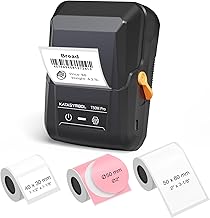
Best for: Buyers who want to create custom labels using a phone, tablet, or PC. Its stated applications include home storage containers, small-business product information, QR codes, barcodes, logos, and school or office supplies.
The T50M Pro prints labels from 3/4 to 2 inches wide and includes three tapes. Its app supports image imports and offers more than 30 fonts, 50 frames, and 660 icons. The product describes its image processing as designed to produce clear, high-resolution output.
Choose this if you want app-based design options and label widths wider than typical narrow tape. Limitation: Designing labels depends on using its app, which may not suit buyers who prefer a printer with a built-in keyboard.
Buying Guide: How to Choose a Print And Apply Labeling System
What are you labeling?
Start with the surface and job. Clothing identification calls for a system specifically described for iron-on labels. Facility warnings, signage, and barcodes point toward an industrial system with relevant software and a broad compatible supply range. For household bins or office folders, a compact tape printer may be sufficient.
How wide do the labels need to be?
Match the printer’s supported width to the design. The Brother model prints approximately 1/2-inch tape, while SUPVAN supports 3/4- to 2-inch labels. Makeid has a 2-inch print head, and LabelTac accepts compatible supplies from 1/2 to 4 inches wide. Check the exact consumables required for any system.
Do you prefer a keyboard, app, or computer software?
A built-in or included keyboard keeps text entry on the device, as with Unitherm and Brother. SUPVAN uses an app for image imports and customization. LabelTac includes LabelSuite software with design templates and tools. Choose the workflow that fits who will create labels and how often designs change.
Will you print occasional labels or batches?
For occasional household labels, prioritize straightforward setup and suitable tape. For batches, consider features such as an automatic cutter, fast output, or easy supply changes. The Unitherm lists output of 3.2 labels per second; the Makeid D50 includes an automatic cutter; and LabelTac highlights supply and ribbon loading.
Frequently Asked Questions
What is a print and apply labeling system?
It is a system used to create labels for identifying products, equipment, clothing, storage, or facilities. The right printer and label material depend on where the label will be applied.
Which option is designed for clothing labels?
The Unitherm Iron On Clothing Label System is specifically described for applying labels directly to clothing.
Which system supports the widest stated label range?
LabelTac LT4 accepts compatible supplies from 1/2 to 4 inches wide, according to its product features.
Which label maker offers app-based customization?
The SUPVAN T50M Pro uses an app for adding images and customizing labels with fonts, frames, and icons.
Which model uses a built-in keyboard?
The Unitherm includes a keyboard that plugs into the printer, while the Brother PT-D220 has a QWERTY-style keyboard for direct entry.