The best plexiglass 3D printer enclosure depends on your printer’s size and whether you need ventilation, storage, or a model-specific fit. The VEVOR is best for a general-purpose transparent enclosure with ventilation, while the TOPCUBE F2 is tailored to Bambu Lab A1 and A1 Combo printers. For a cabinet-style setup, consider ahomrt or Crafit; Prusa XL owners can choose the dedicated 3D SOURCERER kit.
| Product | Best for | Notable feature |
|---|---|---|
| VEVOR Enclosure | Many common printer sizes | Ventilation system |
| ahomrt Cabinet | Filament organization | Storage for up to 30 spools |
| Crafit Cabinet | Multi-color filament setup | Feed-through ports and spool storage |
| TOPCUBE F2 | Bambu Lab A1 and A1 Combo | Acrylic enclosure with active cooling |
| 3D SOURCERER Sumo Kit | Prusa XL owners | Model-specific Plexiglass kit |
VEVOR Transparent Enclosure With Ventilation

The VEVOR enclosure is best for buyers who want a transparent, tent-style cover with ventilation and a broad stated range of printer compatibility. Its listed dimensions are 23.6 × 23.6 × 31.5 inches, and the product description names printers from Bambu Lab, Ender, Neptune, and Kobra families. Measure your printer before ordering rather than relying only on a model-family name.
VEVOR says the enclosure helps maintain a more consistent temperature to reduce warping and cracking, and its ventilation system is designed to expel smoke and dust after printing. The description also mentions an LED. Choose this if you want a general-purpose enclosure with airflow features. Its size may not suit printers larger than the listed interior dimensions, so verify clearance for the printer and its moving parts.
ahomrt Acrylic Printer Cabinet With Filament Storage

This cabinet is best for makers who want an enclosure and a dedicated place to organize filament. It has thick acrylic panels, an iron frame, a 23.6-inch-wide by 23.2-inch-deep desktop, and two lower storage shelves. The product description says the shelves can hold up to 30 one-kilogram spools. A T-shaped filament bar is intended to keep spools accessible, including for multi-color setups.
ahomrt states that closing the cabinet door can reduce noise by 40%. That figure is a product claim, not a guarantee for every printer or room. Choose this option if storage and a work surface matter as much as enclosure coverage. Avoid it if you need a compact cover without a separate cabinet footprint, or if your printer does not fit the stated desktop dimensions.
Crafit Cabinet With Ventilation And Filament Hub
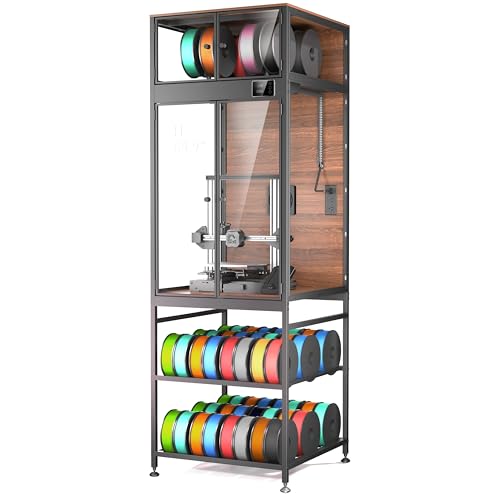
The Crafit is best for buyers who want an enclosed cabinet with integrated filament organization. Its stated maximum printer size is 21.6 inches wide, 22 inches deep, and 28.7 inches high. The cabinet includes a top compartment for up to eight spools and feed-through ports for routing up to four filaments to the printer. Listed features also include ventilation, an LED light, and a thermo-hygrometer.
A heavy-duty carbon steel frame and rigid composite walls are intended to provide a stable, draft-shielded environment. Crafit claims noise reduction of up to 40%; actual results can depend on the printer and surroundings. Choose this model if you need multiple filament feeds and storage in one enclosure. Its stated printer-size limit may rule it out for larger machines.
TOPCUBE F2 Acrylic Enclosure For Bambu Lab A1
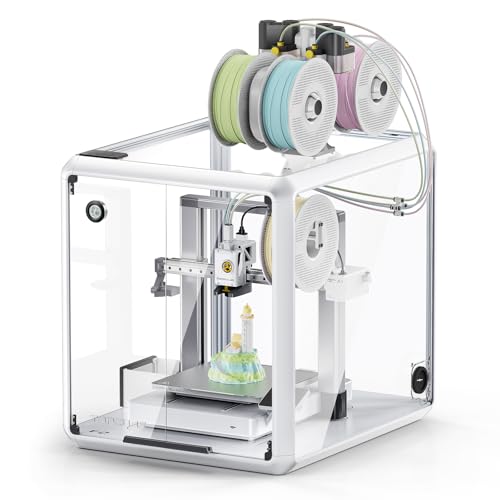
The TOPCUBE F2 is best for Bambu Lab A1 or A1 Combo owners seeking a clear acrylic enclosure designed for those printers. Its listed features include 360-degree transparency, an LED light, and a base with active cooling. The manufacturer says the enclosure supports a more consistent temperature while the base fan helps dissipate heat from the printer and its mainboard.
The enclosed structure is also described as a barrier against accidental contact by children or pets. Choose this if its stated printer fit and cooling-base design match your setup. The product information is specifically oriented to A1 and A1 Combo models, so other printer owners should not assume compatibility without checking dimensions and access requirements.
3D SOURCERER Sumo Plexiglass Kit For Prusa XL
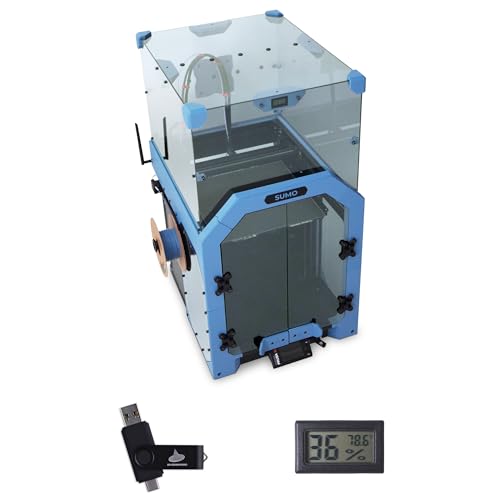
This kit is best for Prusa XL owners who want a model-specific Plexiglass enclosure rather than a universal tent or cabinet. The package description lists Plexiglass or acrylic panels, fasteners, hex rods, magnets, and a hygrometer. The hygrometer is intended to display internal temperature and humidity. The design is described as preserving visibility and access while enclosing the printer.
Check the package contents carefully: printed parts are not included. Choose this if you have a Prusa XL and are prepared to source or make the required printed parts. It is not the right choice for buyers seeking a complete, universal enclosure kit.
Buying Guide: How To Choose A Plexiglass 3D Printer Enclosure
Will the enclosure fit your printer?
Measure the printer’s width, depth, and height, including space needed for the bed, cables, spool holder, and moving components. Compare those measurements with the product’s interior dimensions when provided. A stated compatibility list is a useful starting point, but it does not replace checking your exact printer configuration.
Do you need a cabinet or a simple cover?
A tent-style enclosure such as the VEVOR is aimed at buyers who want a cover and ventilation in one package. Cabinet designs such as ahomrt and Crafit add a work surface or filament storage but need more floor or desk space. A model-specific kit can be a better fit when you own the printer it was designed for.
Should ventilation or temperature control come first?
Compare what each listing actually describes. VEVOR lists a ventilation system, and Crafit lists ventilation and a thermo-hygrometer. TOPCUBE describes active cooling in its base alongside temperature control. These features serve different purposes; consider your material, printer instructions, room setup, and need to monitor or move air.
How much filament storage do you need?
If you keep spools beside the printer, compare the cabinet’s storage capacity and feed-through options. ahomrt lists space for up to 30 one-kilogram spools, while Crafit lists a top compartment for up to eight spools and ports for up to four filaments. Confirm that the organization features match how you print.
Frequently Asked Questions
Does every plexiglass enclosure fit every 3D printer?
No. Enclosures vary in dimensions and design. Measure your printer and check the listing’s compatibility details before choosing one.
Can an enclosure help reduce print warping?
Some enclosures are designed to create a more stable temperature around a printer, which manufacturers say can help reduce warping. Results depend on the printer, material, and setup.
Should I choose an enclosure with ventilation?
Consider ventilation if airflow management is important for your workspace. Compare the specific ventilation features and follow the printer and material manufacturers’ safety guidance.
Is a model-specific enclosure kit complete?
Not always. The 3D SOURCERER Sumo kit, for example, states that printed parts are not included. Review the contents before buying.