Looking for a motorized ceiling TV mount that saves space and delivers smooth, hands-free TV positioning? This guide highlights top options for different needs—from compact setups to heavy TVs—so you can pick the best fit for your room. Ideal buyers include apartment dwellers seeking ceiling clearance, home theater enthusiasts prioritizing flexible viewing angles, and tech-savvy users who want app and voice control. Below, compare five picks and find clear guidance on fit, mounting range, and control options.
Summary table (selected products at a glance):
- VIVO Mount-E-FD75C: 37″–70″, up to 99 lbs, roof-mount flip-down, app/voice control
- monTEK Motorized Ceiling TV Mount: 32″–75″, up to 121 lbs, dual control (remote/app/voice)
- TOPSKY Motorized Ceiling TV Mount (0–80° tilt): 32″–70″, up to 88 lbs, remote control
- TOPSKY Motorized Ceiling TV Mount (±150° swivel): 32″–85″, up to 110 lbs, app/remote
- VIVO Swivel Electric Ceiling TV Mount, 37″–70″, up to 99 lbs, swivel option and app/voice
VIVO Black Electric Ceiling TV Mount For 37–70 In
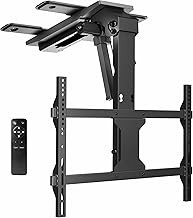
Best for versatile ceiling placements where space is tight and a lower ceiling is a consideration. This model supports VESA patterns from 200×100 to 600×400 mm and handles up to 99 lbs. It offers motorized height control with an RF remote and two memory height settings, plus tilt and level adjustments for optimal viewing angles. Control compatibility includes Tuya app, Amazon Alexa, and Google Home for voice-managed setups. A caveat: for TVs over 65″, ensure mounting holes are centered to keep clearance from the ceiling.
monTEK Motorized Ceiling TV Mount For 32–75 In

Choose this if you need strong load-bearing and a lower VESA fit to avoid ceiling contact. The mount fits 32–75 inch TVs with VESA patterns up to 600×400 mm and supports up to 121 lbs. It features three control methods: remote, smartphone app, and voice commands via Alexa or Google Home. It’s designed for flat or pitched ceilings and uses an extended arm design to clear ceilings. Limitation: while it covers large VESA ranges, ensure your TV’s mounting pattern matches supported configurations.
TOPSKY Motorized Ceiling TV Mount (32–70 In)

Best for rooms where wall mounting isn’t possible or desired and you prefer a tilt-focused solution. This model offers a motorized flips-down design with 0–80° tilt and a remote with up to a 98-foot range. It supports TVs up to 88 lbs and is suitable for flat or select angled ceilings. Caution: it does not provide side-to-side swivel, so consider your layout before purchasing if wide viewing angles are essential.
TOPSKY Motorized Ceiling TV Mount With 150° Swivel

Best for open living spaces where viewing angles must cover multiple seats. This mount provides an impressive ±150° swivel range and supports most flat TVs up to 110 lbs with VESA patterns up to 600×400 mm. Control is via app or remote, and it includes two favorite viewing positions for quick setup. Limitation: wider swivel can introduce more movement noise on some ceiling structures; verify ceiling rigidity before install.
VIVO Swivel Electric Ceiling TV Mount MOUNT-E-FD75C-S

This option stands out for those who want a swivel-capable ceiling mount with a robust motor. It supports 37”–70” screens and up to 99 lbs. Features include a motorized height adjustment, ±90° swivel, and tilt/level adjustments. You can manage height with the RF remote or via Tuya app and voice assistants. Best for rooms needing side-to-side flexibility; caution with larger TVs where clearance from the ceiling might require centered mounting when near the 65″ mark.
Buying Guide: How To Choose The Right Motorized Ceiling TV Mount
What screen size and weight matter?
Confirm TV size and weight fit within the mount’s specified range (e.g., 32″–75″ and up to 121 lbs). Heavier TVs demand reinforced ceilings and robust mounting arms to avoid sagging or vibration.
What about VESA patterns?
Most mounts support common VESA patterns (200×100 to 600×400 mm). Match your TV’s hole pattern to the mount’s supported range. Some models handle tricky lower VESA placements; check this before purchase.
How important is tilt, swivel, and height control?
Tilt improves glare reduction; swivel expands viewing angles. If you sit multiple seats away, a wide swivel (up to ±150°) can improve experience. Height memory settings speed up repeated setups, while remote/app/voice control adds convenience in living rooms, bedrooms, or media rooms.
Control methods and smart home compatibility
Apps (Tuya-compatible) and voice assistants (Alexa, Google Home) simplify daily use. Ensure your preferred ecosystem is supported and that your Wi‑Fi network provides stable connectivity for smooth operation.
Ceiling type and installation considerations
Consider ceiling material and clearance. Some models work with pitched or flat ceilings, while others require centered mounting for TVs near ceiling clearance limits. Professional installation may be beneficial for heavier setups.
Safety and durability
Look for reinforced steel construction and tested load ratings. A secure ceiling anchor and proper wall/ceiling studs are essential to long-term stability and safe operation.
Frequently Asked Questions
- Can I install a motorized ceiling TV mount on a pitched ceiling? Yes, several models support pitched ceilings, but verify the product’s mounting hardware and clearance requirements first.
- Do these mounts work with all smart home ecosystems? Most support popular platforms like Tuya, Alexa, and Google Home, but always confirm compatibility for your setup.
- Is higher weight capacity always better? Higher weight capacity enables larger TVs and sturdier construction, but ensure you do not exceed the mount’s rated torque and ceiling strength.
- Will a motorized ceiling mount reduce glare? Tilt control helps manage glare. For glare-prone rooms, aim for a mount with at least 0° to 80° tilt and a reliable anti-glare position.
- What is the typical installation complexity? Most mounts install onto ceiling joists or using appropriate anchors. Heavier TVs may require professional installation to guarantee safety.
- Can I control these mounts from a phone? Yes, many units offer app control and voice commands through smart assistants for hands-free operation.
When choosing, prioritize hardware strength, compatible TV size and VESA patterns, and the kind of control you want for daily viewing. The five options above provide a range of tilt, swivel, and height features designed to fit various room layouts and smart-home setups.