The best keyless interior door lock depends on how people need to enter: fingerprint access suits frequent users, while keypad models make it easy to share or change codes. The fingerprint-and-keypad biometric knob is best for households wanting multiple entry methods. TEEHO is a strong fit for temporary visitor codes, and the Nyboer handle offers stated door-size details for shoppers checking fit. Compare the access methods, backup options, and installation requirements before choosing a lock for a bedroom, office, or other interior door.
| Lock | Best suited for | Access options |
|---|---|---|
| Biometric Door Knob | Households wanting fingerprint entry | Fingerprint, password, IC card, key |
| TEEHO TE004 | Guest and service-provider access | PIN, temporary code, key |
| Yamiry Keypad Knob | Basic coded access | PIN, key |
| Nyboer Keypad Handle | Buyers checking door dimensions | PIN, temporary code, key |
| Tuya Smart Fingerprint Knob | App-managed access | Fingerprint, passcode, NFC card, key |
Fingerprint Door Lock Biometric Knob
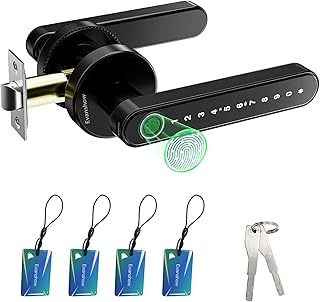
Best for: Families or shared spaces where people want a choice of fingerprint, password, IC card, or mechanical-key entry. The lock supports up to 100 fingerprints and 50 passwords, so it can accommodate multiple household members and guests.
The listed features include a fingerprint sensor described as recognizing prints in less than a second. It also has a USB port for emergency power from an external power bank. Select this model if varied access methods matter more than having app-based controls.
Important limitation: Register an administrator fingerprint before use. Until an administrator is set, any fingerprint can unlock the door. The USB port supplies emergency power; it does not charge the internal batteries.
TEEHO TE004 Keypad Entry Handle

Best for: Interior doors used by family, guests, cleaners, or other visitors who need separate or temporary access. The keypad supports up to 20 user PIN codes, one-time codes that automatically delete after use, and two physical backup keys.
Choose this lock if managing visitor access without handing out a permanent code is a priority. Auto-lock can be set to engage after 10 to 99 seconds, and a two-second press of any key activates one-touch locking. Its backlit keypad helps with nighttime use, and mute mode can silence keypad sounds.
Limitation: Entry is based on keypad codes or physical keys; fingerprint access is not listed among its features.
Yamiry Keypad Smart Door Knob

Best for: Buyers seeking a straightforward keypad knob with backup key access. The lock accepts 4- to 8-digit codes and supports up to 20 user codes, as well as a one-time code for guests. A backlit keypad and low-battery indicator are also listed.
The product description says it can be installed in less than 15 minutes using a screwdriver. Its stated construction is aluminum alloy, and the features include an anti-prying user code and IP54 weather resistance. This is a practical option when PIN entry is sufficient and a mechanical key is useful as a backup.
Limitation: The supplied information does not specify door thickness or bore-hole dimensions. Check the product’s fit requirements against the intended door before buying.
Nyboer Keypad Door Lock With Handle

Best for: Shoppers who want published door-size specifications and keypad-only setup. The lock is listed for doors 1-3/8 to 2 inches thick, with a 1-1/2- or 2-1/8-inch hole diameter. It supports up to 20 custom 4- to 8-digit passwords, one-time visitor codes, and two mechanical keys.
Other listed features include an anti-peep password function, a backlit keypad, low-battery reminder, and IP65 weather resistance. The description says settings are adjusted on the keypad without an app and installation requires a screwdriver, with no drilling required.
Limitation: Four AA batteries are required and are not included. The stated 8- to 12-month battery life is product information, not a guarantee for every use pattern.
Tuya App Fingerprint Door Knob

Best for: Buyers who want to manage access through an app as well as use a fingerprint or passcode. The listed access methods include fingerprint, keypad passcode, NFC card, and mechanical key. App features include assigning permanent or temporary access, viewing entry logs, and enabling silent mode.
The fingerprint feature is described as unlocking in 0.5 seconds. Choose this model if remote passcode management and entry records are more useful than a simple standalone keypad. The product description refers to Tuya app control and management of access permissions.
Limitation: App-managed functions rely on the app, so this may be more involved than a lock whose settings are handled directly on the keypad. The supplied details do not state specific door measurements.
Buying Guide: How To Choose A Keyless Interior Door Lock
Which access method fits your household?
Fingerprint locks reduce the need to remember a code, but users must register fingerprints and follow the setup instructions. Keypad locks are easier to share with visitors, especially when they support temporary codes. App-managed locks add remote permission features, while mechanical keys provide a physical backup on several models here.
Do you need temporary codes or entry records?
For guests or service providers, prioritize locks that explicitly support one-time or temporary codes. TEEHO and Nyboer list temporary codes that expire after use. The Tuya model lists app-based access management and entry logs. Confirm which functions matter before choosing a more feature-rich lock.
Will the lock fit the door?
Measure door thickness and the existing hole before ordering. The Nyboer description provides a thickness range and hole diameters; the other supplied descriptions do not provide equivalent measurements. Also consider whether the door needs a knob or handle format and whether the lock is intended for an interior or exterior location.
What should you check about power and setup?
Review battery requirements and low-battery alerts. The Nyboer uses four AA batteries, which are not included. The biometric model’s USB port is for emergency external power, not battery charging. Follow administrator setup directions before allowing fingerprint access, and verify installation steps for the specific door.
Frequently Asked Questions
Are keyless door locks suitable for bedroom doors?
They can be used for bedrooms when the lock’s format and measurements match the door. Check the product’s installation requirements and consider whether occupants need a mechanical-key backup.
Which listed lock supports the most fingerprint users?
The biometric door knob supports up to 100 fingerprints, according to its product details.
Which options support temporary visitor codes?
TEEHO, Yamiry, Nyboer, and the Tuya app lock list temporary or one-time access options. Their code management methods differ, so review the individual features.
Do these locks require a smartphone app?
The Tuya model lists app management. Nyboer says settings are adjusted directly on the keypad without an app. The other product descriptions do not establish that an app is required.
Can these locks still be opened with a key?
Mechanical backup keys are listed for the biometric knob, TEEHO, Yamiry, Nyboer, and Tuya models. Check the product details for the exact number and type supplied.