To hang a projector from the ceiling, choose a mount that fits its mounting holes, weight, and placement needs, then secure it to a suitable ceiling structure. The PUTORSEN tray is best for projectors or devices without a compatible mounting thread; the PropVue suits models with spaced mounting holes; and the Aurzen is designed for a centered 1/4-inch thread. Mini-projector owners can compare the compact threaded mounts below.
| Mount | Best For | Key Fit Detail |
|---|---|---|
| PUTORSEN Adjustable Tray | Projectors or devices placed on a shelf | Tray supports up to 22 pounds |
| PropVue Universal Mount | Projectors with spaced mounting holes | Hole distances from 5.2 to 14 inches |
| Aurzen Ceiling Mount | Light projectors with a centered thread | Centered 1/4-inch thread; up to 5.5 pounds |
| Mini Ceiling Wall Mount | Compatible mini projectors | Check projector fit before buying |
| BAISHUN Threaded Mount | Light mini or short-throw projectors | 1/4-inch thread; up to 4.4 pounds |
PUTORSEN Adjustable Projector Ceiling Mount
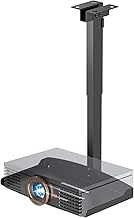
Best for: Buyers who need a broad tray rather than a mount that attaches directly to the projector’s threaded hole. The metal tray measures 13.77 by 8.66 inches and holds up to 22 pounds. It can also hold a video camera, laptop, or other electronic device, according to the listed features.
The arm adjusts from 14.17 to 21.65 inches from the ceiling, and the mount can be installed on a ceiling or wall. Listed features mention hidden cable routing and step-by-step instructions. Choose this model if your projector can sit securely on a platform or you need a tray for another device.
Limitation: The provided installation details say to screw the assembled mount to the ceiling or wall. Confirm the mounting method and surface requirements before purchasing, particularly if you expect a no-hole installation.
PropVue Adjustable Ceiling And Wall Mount

Best for: Owners of regular or mini projectors whose mounting-hole distance falls between 5.2 and 14 inches. This mount supports up to 16.4 pounds and can be installed on a ceiling or wall. Its telescoping arm adjusts from 13.8 to 21 inches, giving buyers flexibility when setting the projector’s position.
Choose this model if your projector has mounting holes that match its stated range and you want an adjustable arm instead of a tray. It is listed for home entertainment, classroom, and conference-room setups.
Limitation: The listed features do not specify compatibility with a projector that has only a single 1/4-inch threaded hole. Measure the hole spacing and check the mounting arrangement before ordering.
Aurzen Adjustable Ceiling Projector Mount

Best for: Buyers with a projector weighing no more than 5.5 pounds and featuring a centered 1/4-inch thread. The mount offers 360-degree rotation and 90-degree vertical tilt, making it a fit for people who need to adjust the viewing direction after installation.
The listed compatibility includes projectors from Aurzen, TMY, HAPPRUN, Yaber, Epson, and other brands, provided they meet the thread and weight requirements. Choose it if you want a compact threaded mount with motion adjustment.
Limitation: It is not compatible with the Aurzen D1 MAX. Off-center holes, M6 or M8 threads, and projectors without the supported centered 1/4-inch thread are also excluded.
Mini Ceiling Wall Projector Mount Stand

Best for: Owners of supported mini projectors who want a compact ceiling or wall mount. The listing names QKK, DR.J, DBPOWER, Anker, VANKYO, AAXA, Jinhoo, PVO, TMY, and AuKing, along with most other mini projectors. Its stated length is 175 millimeters.
Choose this mount if your projector is a mini model and its attachment point matches the mount. The broad named-brand list may help narrow down compatibility, but the projector’s own mounting details should still be checked before installation.
Limitation: The provided features do not state a maximum supported weight or describe adjustment range. Verify those details and the attachment fit for your projector before hanging it overhead.
BAISHUN 1/4-Inch Thread Projector Mount

Best for: Buyers with a light projector weighing up to 4.4 pounds and a compatible 1/4-inch thread. Its adjustment features include 360-degree rotation, 30-degree upward tilt, 90-degree downward tilt, and 180-degree arm adjustment. The listing describes it for mini and short-throw projector setups as well as home theaters, classrooms, conference rooms, gaming, and streaming.
Choose this mount if you need several angle adjustments and your projector meets the stated thread and weight limits.
Limitation: The product information says it does not support vaulted ceilings or regular drywall. Check the installation surface and follow the included mounting requirements before use.
Buying Guide: What To Check Before Hanging A Projector
Does the mount fit the projector?
Check whether the projector has a centered 1/4-inch thread, multiple mounting holes, or needs to sit on a tray. Match the mount’s stated hole spacing or thread type to the projector’s specifications. Brand names alone do not confirm fit, especially when a product lists specific exclusions.
How much weight can the mount support?
Compare the projector’s weight with the mount’s stated maximum capacity. The listed limits vary: the PUTORSEN tray supports up to 22 pounds, PropVue supports up to 16.4 pounds, Aurzen up to 5.5 pounds, and BAISHUN up to 4.4 pounds. The mini stand’s provided features do not state a weight limit, so seek confirmation before use.
Should you choose a tray or a threaded mount?
A tray is a practical choice when the projector lacks compatible mounting holes or when you want to support another device. A threaded or multi-hole mount attaches to specified points on the projector and may offer more direct angle adjustment. Confirm the device sits securely and does not exceed the mount’s capacity.
How should you plan the ceiling position?
Measure the distance from the ceiling and check the mount’s adjustment range before installation. Consider the projector’s intended position relative to the screen, cable routing, and access for future adjustments. Install only on a surface and with hardware suitable for the mount; do not assume every model works with drywall or a vaulted ceiling.
Frequently Asked Questions
Can any projector be hung from the ceiling?
No. The projector must fit the mount’s attachment system and stay within its weight limit. Some models need a tray, while others use threaded holes or multiple mounting points.
Is a 1/4-inch thread the same as a multi-hole mount?
No. A 1/4-inch threaded mount requires a compatible threaded point. A multi-hole mount uses a set of mounting holes with a specified spacing range.
Can I mount a projector directly to drywall?
Check the mount’s installation instructions and surface requirements. The BAISHUN listing specifically says it does not support regular drywall or vaulted ceilings; requirements differ by product.
How do I choose between a ceiling and wall mount?
Choose based on the projector’s required position, available mounting surface, and the mount’s stated installation options. Several products here are described for both ceiling and wall use, but confirm surface compatibility before installation.
What should I measure before buying?
Measure projector weight, mounting-hole spacing or thread type, and the desired distance from the ceiling. Also confirm the available adjustment range and whether the mount’s installation method suits your ceiling or wall.