The best front door lock with a code depends on whether you want simple keypad access, app control, or several entry methods. The TEEHO TE001 is best for households that need family and one-time guest codes without listed app features. The Philips WiFi deadbolt suits buyers who want remote management, while Kucacci adds fingerprint and app access. Compare the five options below by entry method, connected features, and installation considerations.
| Lock | Best For | Standout Feature |
|---|---|---|
| TEEHO TE001 Matte Black | Households and occasional guests | 20 codes and a one-time code |
| Philips WiFi Keypad Deadbolt | Remote app management | Built-in WiFi and access history |
| TEEHO TE001 Bronze | Buyers choosing a bronze finish | Automatic locking options |
| Kucacci Keypad Smart Lock | Multiple ways to unlock | Fingerprint, PIN, app, fob, and key |
| Zowill Keypad Deadbolt | Code access with backup keys | 20 user codes and two backup keys |
TEEHO TE001 Matte Black Keypad Deadbolt

The TEEHO TE001 is best for households that want a straightforward code-based lock with separate access for family and temporary guests. It supports up to 20 access codes and a single-use guest code that is automatically deleted after use. That makes it easier to provide short-term access without keeping a guest PIN active.
Automatic locking can be set to engage after 10 to 99 seconds, and the keypad also supports one-touch auto-lock by holding any key for two seconds. The matte black finish offers a dark look for the entry door.
Limitation: The listed features do not describe app or remote control. Choose another option if managing the lock from a phone is essential.
Philips WiFi Keypad Deadbolt With Handle

This Philips lock is best for buyers who want to manage a front door remotely. It connects directly to a 2.4GHz WiFi network without an additional hub or bridge. Through the Philips Home Access App, users can lock or unlock the door, manage user codes and fingerprints, check lock status, and review access history.
The listed features also include Alexa and Google Assistant voice control for locking or checking status. For a useful comparison, this lock emphasizes connected access, whereas the TEEHO models focus on keypad codes and timed auto-lock.
Limitation: The product information says to keep the lock within 33 feet of the WiFi router and minimize obstacles. Check that the door location can maintain a suitable connection.
TEEHO TE001 Bronze Keypad Deadbolt

The bronze TEEHO TE001 is best for buyers who want the same listed code and locking functions as the matte black version in a different finish. It provides 20 access codes for household use, plus a temporary one-time PIN that is deleted after use. This is useful when a guest needs access for a single entry.
Like the other TE001 listing, it can lock automatically after a selected 10-to-99-second delay. Holding any keypad key for two seconds activates one-touch auto-lock. It is a practical choice when keypad entry and guest-code control matter more than phone-based features.
Limitation: The listed product features do not include app control or remote unlocking. The main distinction from the other TE001 option here is the bronze finish.
Kucacci Keypad Smart Door Lock With Handle

Kucacci is best for buyers who want several ways to unlock a door. Listed entry methods include fingerprint, PIN code, smartphone app, key fob, and mechanical key. The app can assign permissions, generate one-time or permanent codes remotely, and track access in real time.
The product description says the handle is reversible for left- or right-opening doors and describes DIY installation using a screwdriver. It also lists an auto-lock feature. Alexa voice control and remote unlocking require a WiFi Gateway, so this model offers a broader set of access methods but has an added equipment requirement for those connected functions.
Limitation: Do not assume Alexa or remote unlocking works without the separately required WiFi Gateway. Confirm that the lock’s installation format suits your door before choosing it.
Zowill Keypad Deadbolt With Handles
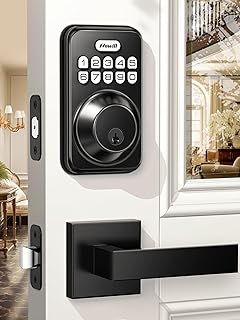
The Zowill is best for buyers who want keypad codes and a physical backup option. It supports 20 user codes, a one-time code, and two backup keys. Those choices can serve household members, visitors, cleaners, or other people who need different access methods.
Its auto-lock can be activated by holding any key for two seconds or set to engage after 10 to 99 seconds. The listed features also state that the lock has ANSI Grade 3 certification and was tested for up to 100,000 uses. Its alloy construction is described as having 2,000N appearance pressure resistance.
Limitation: The listed features do not describe smartphone app or remote access. Choose it for keypad and key access rather than connected controls.
Buying Guide: How to Choose a Front Door Lock With Code
Do you need app or remote control?
For remote status checks and app-based access management, the Philips model lists built-in WiFi and an app, while Kucacci lists app functions and remote access through a required WiFi Gateway. The TEEHO and Zowill feature lists focus on keypad entry and do not specify remote control. Check network requirements and gateway needs before buying.
How many people need access?
Compare the number and type of codes. Both TEEHO versions and Zowill list 20 user codes, with one-time access also available. Kucacci lists permanent and one-time codes through its app. A single-use code is useful for temporary access, while recurring household members may need ongoing PINs or another supported entry method.
Which backup entry methods matter?
If you want an alternative to a PIN, Kucacci lists fingerprints, a key fob, and mechanical keys. Zowill lists two backup keys. Review the exact access methods in the product listing and decide whether the household prefers a physical key, biometric access, or app control.
What should you check before installation?
Confirm the lock format, handle arrangement, and door requirements against the product listing before ordering. Kucacci describes a reversible handle and screwdriver installation, but that does not establish compatibility with every door. For WiFi models, consider router distance and obstacles. Also decide whether automatic locking is desirable and whether its available timing settings suit your household.
Frequently Asked Questions
Can a front door lock with a code give guests temporary access?
Yes. The TEEHO TE001 models and Zowill list one-time codes. TEEHO says its code is automatically deleted after use. Kucacci lists one-time codes through its app.
Which option lists built-in WiFi?
The Philips WiFi Keypad Deadbolt lists direct 2.4GHz WiFi connection without a hub or bridge. Its product information recommends keeping it within 33 feet of the router.
Do all of these locks support app control?
No. Philips and Kucacci list app features. The supplied feature information for TEEHO and Zowill does not specify app control.
Which lock offers backup keys?
Zowill lists two backup keys, and Kucacci lists mechanical keys. The supplied features for the other models do not specify backup keys.
Can these locks automatically relock the door?
TEEHO and Zowill list timed auto-lock settings from 10 to 99 seconds and a keypad-based auto-lock action. Kucacci also lists an auto-lock feature; Philips lists app-based locking but the supplied features do not specify timed auto-lock.