The best electric TV ceiling mount depends on your screen’s size, weight, VESA pattern, and whether you need swivel or smart-home control. The TOPSKY model suits buyers seeking a straightforward remote-operated drop-down mount, while monTEK’s 121-pound-capacity option is designed for heavier TVs and lower-positioned VESA holes. For app or voice control, choose a compatible VIVO or monTEK model; for side-to-side adjustment, the VIVO swivel version is the standout choice.
| Mount | Best For | Notable Feature |
|---|---|---|
| VIVO MOUNT-E-FD75C | Smart controls and memory positions | App and voice control; up to 70-inch TVs |
| TOPSKY Motorized Mount | Simple remote operation | 88-pound capacity; remote range up to 98 feet |
| monTEK 121 lb Mount | Heavier TVs and lower VESA holes | Supports TVs up to 75 inches |
| monTEK 99 lb Mount | Remote, app, or voice control | 0–80-degree tilt |
| VIVO Swivel Mount | Side-to-side viewing adjustment | Up to 90 degrees of swivel in either direction |
VIVO MOUNT-E-FD75C Electric Ceiling Mount
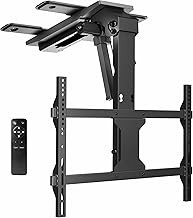
Best for: Buyers who want app and voice control alongside remote operation. This flip-down mount fits 37- to 70-inch screens and lists VESA patterns from 200×100mm through 600×400mm. Its RF remote offers two programmable height settings, while the Tuya app, Alexa, and Google Home provide additional control options and three app memory settings.
The mount has a manual tilt range of 0 to -80 degrees and screen leveling of +3 to -3 degrees. It is a good match for a room where the TV needs to fold up when not in use and lower to a saved viewing position.
Limitation: The listing advises that TVs over 65 inches need centered VESA holes for adequate ceiling clearance. Check the TV’s mounting pattern before choosing this model.
TOPSKY Motorized Ceiling TV Mount

Best for: Buyers who want a remote-controlled mount with a stated 88-pound capacity. TOPSKY lists compatibility with 32- to 70-inch TVs and provides a remote with a range of up to 98 feet. Its motorized tilt adjusts from 0 to 80 degrees, with ±2-degree screen leveling for angle fine-tuning.
The mount folds against the ceiling to save wall and floor space. That makes it worth considering for bedrooms, apartments, lofts, or commercial rooms where a wall mount is not suitable. Its feature set focuses on motorized lowering, tilt, and remote control.
Limitation: This is a flip-down-only design with no left-right swivel. Choose another model if viewers need to change the screen’s horizontal direction.
monTEK Motorized Mount With 121-Pound Capacity

Best for: Buyers whose priority is the highest listed capacity among these five options or support for lower-positioned VESA holes. The mount is listed for 32- to 75-inch flat and curved TVs, up to 121 pounds, with VESA patterns from 200×100mm to 600×400mm. Its extension arms are intended to help address clearance concerns associated with lower VESA placement.
Control options include a remote, the Tuya smartphone app, and voice commands through Alexa or Google Home. The product listing also states that the mount has undergone 20,000-plus extension cycles and testing at four times its rated load.
Limitation: A stated capacity does not confirm that a specific TV will fit. Verify the TV’s weight, VESA pattern, and ceiling installation requirements before purchase.
monTEK Motorized Mount With Remote And App

Best for: Buyers seeking several control methods without needing the 121-pound-capacity model. This monTEK mount fits listed TV sizes from 37 to 75 inches, supports up to 99 pounds, and accommodates VESA patterns from 200×100mm to 600×400mm.
The motor provides a 0–80-degree tilt range and ±2-degree leveling. The listing identifies a remote, Tuya mobile app, and Alexa or Google Home voice control, making this a flexible option for a living room, bedroom, or home theater where users want more than one way to adjust the screen.
Limitation: Its stated capacity is lower than the other monTEK option in this guide. Choose it only after checking that the TV’s weight and mounting pattern fall within its listed limits.
VIVO Swivel Electric Ceiling TV Mount

Best for: Buyers who need the screen to turn toward different seating areas. This VIVO mount fits 37- to 70-inch TVs and lists VESA patterns from 200×100mm to 600×400mm. It adds +90- to -90-degree swivel to motorized height adjustment, along with a manual tilt range of 0 to -75 degrees.
The RF remote has two height memory settings. Tuya app, Alexa, and Google Home control are also listed, with three memory settings available through the apps. This is the clearest choice in the group when horizontal repositioning matters.
Limitation: For TVs over 65 inches, the listing calls for centered VESA holes to provide enough ceiling clearance. Confirm that placement before selecting the mount.
Buying Guide: How To Choose An Electric TV Ceiling Mount
Does the mount fit your TV?
Check the screen size, TV weight, and VESA pattern against the mount’s listed limits. Screen size alone is not enough to establish compatibility. Measure the horizontal and vertical distances between the TV’s mounting holes, and compare that pattern with the product specifications. Also check the TV’s weight without assuming that a larger capacity guarantees a fit.
Do you need swivel or only a drop-down motion?
A flip-down mount lowers the TV from the ceiling and may provide tilt for viewing-angle adjustment. It does not necessarily turn the screen left or right. Of the models here, the VIVO swivel mount specifically lists up to 90 degrees of movement in either direction. TOPSKY explicitly has no left-right swivel.
Which controls and adjustments matter?
Choose a remote-only model if you want basic control, or prioritize app and voice operation if those methods fit your setup. Compare the stated tilt range, leveling adjustment, and programmable memory positions. Remote range is specified for TOPSKY; memory settings and smart-home control are listed for the VIVO and monTEK products.
What should you check before ceiling installation?
Confirm that the ceiling structure and installation location can support the complete mounted load according to the product instructions. Check clearance for the TV as it lowers and folds, especially for larger screens or TVs with off-center mounting holes. If the product listing flags a VESA-position requirement, treat it as a compatibility check rather than an optional convenience.
Frequently Asked Questions
Can an electric ceiling TV mount fold the TV out of sight?
These models are designed to lower and raise a TV from the ceiling. TOPSKY specifically states that its mount folds neatly against the ceiling; check each product’s instructions for its folded position and required clearance.
Do all electric ceiling mounts swivel?
No. TOPSKY is listed as flip-down only with no left-right swivel. The VIVO swivel model lists horizontal adjustment from +90 to -90 degrees.
Are app and voice controls available on every model?
No. App and voice control through Tuya, Alexa, or Google Home are listed for both VIVO models and both monTEK models. TOPSKY’s provided features describe remote operation.
How do I check whether my TV’s VESA pattern fits?
Measure the distance between the mounting holes horizontally and vertically in millimeters. Compare both measurements with the VESA patterns listed for the mount, then confirm the TV’s weight and screen size are also within its specifications.
Which listed mount has the highest stated capacity?
The monTEK model for 32- to 75-inch TVs lists a capacity of up to 121 pounds. Verify your TV’s weight and mounting pattern before selecting it.