The best door knob with a keypad depends on how you want to manage access. The Veise KS03 is best for straightforward code entry with backup keys, while the Yamiry digital lock suits households that need multiple codes and a guest code. For fingerprint access, consider the biometric model or IRONZON; the Yamiry fingerprint model adds app control. Compare the access methods, setup requirements, and door fit before choosing.
| Product | Best For | Access Options |
|---|---|---|
| Yamiry Digital Lock | Families and guest access | Codes and key |
| Biometric Door Knob | Fingerprint access | Fingerprint, password, keys, IC cards |
| IRONZON Smart Knob | Multiple unlock methods | Fingerprint, passcode, app, keys |
| Yamiry Fingerprint Lock | App-enabled access | Fingerprint, password, key fobs, app |
| Veise KS03 | Simple keypad entry | Codes and spare keys |
Yamiry Keypad Smart Door Knob

This keypad door knob is best for households that want several personal codes and a separate option for visitors. It supports up to 20 codes, including a one-time code for guests, and it includes a key for mechanical entry. The 4–8 digit code format and backlit keypad are useful features for routine code-based access.
The lock is made from aluminum alloy and lists an IP54 weather-resistance rating, a low-battery indicator, and an anti-prying user code feature. The manufacturer says installation takes less than 15 minutes with a screwdriver. Choose this model if you want keypad entry without relying on app control. A limitation is that app or fingerprint access is not listed among its features.
Fingerprint Door Knob With Keypad
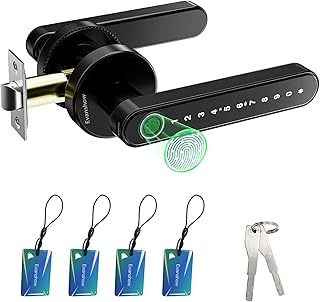
This biometric door knob is best for buyers who want fingerprint entry alongside several backup methods. It offers fingerprint, password, mechanical-key, and IC-card access. The listed capacity is up to 100 fingerprints and 50 passwords, making it better suited than a basic keypad lock for households or shared spaces with many users.
The product describes fingerprint recognition in less than a second and includes a USB port for emergency power. Before use, an administrator fingerprint must be registered. Until that setup is complete, any fingerprint can unlock the door, so completing the initial configuration is essential. The USB port supplies emergency power; it does not charge the lock’s internal batteries.
IRONZON 4-In-1 Smart Fingerprint Knob

The IRONZON is best for buyers who want fingerprint, passcode, app, and key access in one lock. It supports up to 50 fingerprint users and 100 passcode users. Listed functions include automatic locking, passage mode, privacy mode, and an anti-peep keypad. The product states that fingerprint and app data are stored locally rather than uploaded to cloud storage.
App control and remote unlocking require a Tuya Gateway, so choose another model if gateway-free remote access is a priority. The lock is described as fitting standard U.S. door sizes and supporting left- and right-handed doors. Check your door measurements against the supplied sizing template before installation.
Yamiry Fingerprint Keyless Entry Lock

This Yamiry model is best for buyers who want to manage access through an app as well as use a keypad or fingerprint. It connects by Bluetooth and lists support for 50 passwords, fingerprints, and key fobs. The lock is made of aluminum, and the product says it fits most American standard doors and can be installed with a screwdriver.
A Wi-Fi gateway, sold separately, is required for remote control. Without that gateway, the listed connection is Bluetooth, so avoid this option if remote access is essential and you do not plan to add the accessory. Its combination of app programming and several credential types makes it more flexible than a keypad-only knob.
Veise KS03 Keypad Door Knob

The Veise KS03 is best for buyers who want keypad entry without fingerprint or app features. It supports up to 20 user codes of 4–10 digits, plus a one-time code, and includes two spare keys. The lock can be operated from inside with a thumb turn; from outside, pressing and holding any key for two seconds locks it without entering a code.
The product lists compatibility with most American standard left- and right-handed doors that are 1-3/8 to 2 inches thick. Installation and programming are described as requiring only a screwdriver and about 10 minutes. Its main limitation is that the listed access methods are codes and keys, not biometric or app-based entry.
Buying Guide: How To Choose A Keypad Door Knob
Do you need codes, fingerprints, or app control?
For simple code entry, compare the Yamiry digital lock and Veise KS03. Both list support for up to 20 user codes, and each offers a guest-oriented one-time code. If fingerprint access matters, look at the biometric lock or IRONZON. For app management, the Yamiry fingerprint model and IRONZON offer app features, but remote control requires a separately purchased gateway for each product.
How many people need access?
Check the stated user capacity against your household or property needs. The biometric model lists up to 100 fingerprints and 50 passwords; IRONZON lists up to 50 fingerprints and 100 passcodes. For smaller code-based access lists, the Veise and keypad-only Yamiry each support up to 20 codes.
Will the lock fit your door?
Confirm door thickness, handing, and the lock’s stated fit before ordering. Veise lists a door-thickness range of 1-3/8 to 2 inches and compatibility with left- and right-handed doors. IRONZON also describes support for both handing directions and standard U.S. door sizes. Follow the product’s installation information rather than assuming all knobs fit every door.
What should you know about setup and backup entry?
Consider whether you are comfortable setting up codes or fingerprints and whether you want a physical-key backup. The biometric model requires an administrator fingerprint before normal use. Several products list mechanical keys, while the biometric model also provides emergency power through USB. Review battery and emergency-entry instructions for the specific lock you choose.
Frequently Asked Questions
Can a keypad door knob work without an app?
Yes. The Yamiry digital lock and Veise KS03 list keypad codes and mechanical keys without app control as a feature.
Which listed lock supports one-time guest codes?
The keypad-only Yamiry model and Veise KS03 both list one-time codes for guest access.
Does the IRONZON lock offer remote app control on its own?
No. Its listed remote app control and unlocking require a Tuya Gateway.
What must be done before using the biometric door knob?
Register an administrator fingerprint first. The product states that any fingerprint can unlock it until an administrator is set.
Do keypad door knobs always include a physical key?
No. Check each product’s listed features. The Yamiry keypad lock, biometric model, IRONZON, and Veise list mechanical keys; verify the details for any model you consider.