The best digital family command center depends on how much display space your household needs and which planning tools matter most. The 15.4-inch Skylight is a strong fit for families seeking a shared calendar and chore chart, while the 21.5-inch ApoloSign and 22-inch DAKboard offer larger displays. For meal planning and task lists, consider the 10.1-inch smart calendar or 15.6-inch Yemsd model.
| Product | Best For | Notable Features |
|---|---|---|
| Skylight 15.4-inch | Shared calendar and chores | Multiple calendar sync options; wall or counter placement |
| Yemsd 15.6-inch | Meal planning and rewards | Chore points; shared editing; no subscription fees |
| Smart Calendar 10.1-inch | Compact household planning | Meal planner; to-do list; color-coded schedules |
| ApoloSign 21.5-inch | Large, customizable dashboard | Calendar and Android modes; no subscription required |
| DAKboard 22-inch | Large, easy-to-view display | Chore leaderboard; child lock; wall mount included |
Skylight 15.4-Inch Calendar and Chore Chart

The Skylight Calendar combines a shared schedule with an interactive chore chart on a 15.4-inch touchscreen. It syncs with Google, iCloud, Outlook, Cozi, and Yahoo calendars over Wi-Fi, and family members can add events on the device or through the app. Color-coded schedules help distinguish household members’ plans.
Best for: Families that want a straightforward shared calendar and chore chart in a display that can be wall-mounted or placed on a counter. It is selected for its broad list of calendar integrations and flexible placement. Consider: Its feature list focuses on scheduling and chores, so choose another option if built-in meal planning or an Android dashboard is a priority.
Yemsd 15.6-Inch Calendar and Meal Planner
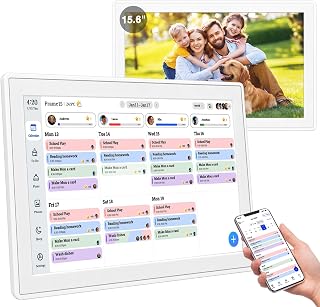
This 15.6-inch touchscreen brings family calendars, meal planning, and chore charts together. The listed features include real-time syncing with Google, Outlook, iCloud, and other platforms, plus simultaneous editing by multiple family members. Its chore system lets children check off tasks and earn reward points. The product is described as having no subscription fees.
Best for: Households that want meal planning and shared schedule updates alongside chore rewards. It is a good match when several family members need to edit plans. Consider: Batteries are not included, according to the product information; check the setup requirements before choosing it.
10.1-Inch Smart Digital Family Calendar

This compact touchscreen calendar combines schedules, chores, meal planning, and to-do lists. It syncs with Google, iCloud, Outlook, Cozi, and Yahoo, and supports custom colors for family members. Its listed features also include dual-band Wi-Fi and a chore chart that lets children mark tasks complete.
Best for: Families that want several planning tools in a smaller 10.1-inch display for a counter or desk. It is selected for combining meal and task planning with calendar syncing. Consider: Its screen is smaller than the 15.4-, 15.6-, 21.5-, and 22-inch options, so it may be less suited to viewing schedules from across a large room.
ApoloSign 21.5-Inch Dual-Mode Calendar

The ApoloSign offers a 21.5-inch touchscreen with two modes: Calendar Mode for family scheduling and Android Mode for a customizable dashboard with apps and widgets. It syncs calendars including Google Calendar, iCloud, and Outlook. Other listed tools include reward-based chores, grocery and shopping lists, wish lists, and weekly meal planning. The product information states that no subscription is required.
Best for: Families seeking a large screen and the option to customize a dashboard beyond calendar scheduling. It stands out for combining calendar, chore, and household-list features. Consider: The additional Android mode may be unnecessary for buyers who want only a focused calendar and chore display.
DAKboard 22-Inch Touchscreen Calendar

DAKboard provides a 22-inch HD touchscreen designed to show shared monthly calendars, family schedules, and daily routines. It connects with Google Calendar, Apple iCal, and Microsoft Outlook, with updates added from a phone syncing to the display. The chore chart includes task completion, custom reward points, and a family leaderboard. A child lock helps prevent accidental list changes, and a wall mount is included.
Best for: Families prioritizing a large wall display, chore rewards, and a child lock. It is selected for its 22-inch screen and included wall mount. Consider: The listed calendar integrations are Google, Apple iCal, and Outlook; households relying on other services should verify whether those fit their needs.
Buying Guide: How to Choose a Digital Family Command Center
How large should the display be?
Screen size affects how schedules can be viewed in a shared space. The 10.1-inch model is the most compact option in this selection, while the 21.5- and 22-inch displays emphasize at-a-glance viewing. Consider the distance from the usual viewing area and the available wall or counter space before choosing.
Which calendar services need to sync?
Check that the product supports the calendar platforms your household already uses. The listed options vary: Skylight and the 10.1-inch model name Google, iCloud, Outlook, Cozi, and Yahoo, while DAKboard lists Google Calendar, Apple iCal, and Microsoft Outlook. Confirm current compatibility details with the seller if a particular service is essential.
Do you need chores, meal planning, or a general dashboard?
For chore tracking, compare how each model handles task completion and rewards. DAKboard lists a leaderboard and child lock; Yemsd and ApoloSign describe reward-based chore features. For meal planning and lists, Yemsd, the 10.1-inch calendar, and ApoloSign include these tools. ApoloSign is the option here with a described Android dashboard mode.
What should you check before setup?
Decide whether the display will be wall-mounted or placed on a counter, and check what mounting or stand options are included. The DAKboard listing says a wall mount is included; Skylight is described as suitable for wall or counter placement. Also review power and setup requirements. The Yemsd listing specifically notes that batteries are not included.
Frequently Asked Questions
What does a digital family command center do?
It brings household schedules and planning tools onto a shared display. Depending on the model, those tools can include calendar syncing, chore charts, meal plans, and lists.
Can family members update a digital calendar from a phone?
Some listed products support updates through an app or phone-connected calendar. Skylight describes adding events through its app, and DAKboard describes phone updates that sync to the display.
Which option includes meal planning?
The Yemsd 15.6-inch calendar, 10.1-inch smart calendar, and ApoloSign list meal-planning features.
Which product has the largest screen in this selection?
The DAKboard touchscreen has a 22-inch display. The ApoloSign is the next largest at 21.5 inches.
Do these products require a subscription?
The Yemsd and ApoloSign product information says no subscription fees or no subscription required. Check each product’s current terms for details beyond the listed features.