The best automatic handicap door opener depends on the doorway and how people will activate it. The Olideauto WiFi operator is best for buyers who want app or voice control, while the DSW120 suits users seeking wireless fob or exit-button activation. For two swinging doors, choose the dual-door operator. The options below also include simpler button-operated models. Compare activation methods, door setup, safety features, and installation requirements before choosing.
| Product | Best For | Notable Feature |
|---|---|---|
| Olideauto WiFi Swing Door Operator | Smart controls | App and voice control |
| Olideauto WiFi Operator with Receiver | Button activation and smart controls | Wireless or wired button mode |
| Olideauto DSW120 | Fob or exit-button activation | Adjustable operating parameters |
| Olideauto Dual Door Operator | Two swinging doors | One button can activate both doors |
| Olideauto Black Operator | Hardwired push-button setup | Hand-programmable settings |
Olideauto WiFi Handicap Door Opener

This low-energy swing door operator is best for buyers who want several ways to control a single accessible doorway. Its listed features include stainless steel push buttons, WiFi operation through a phone app, and voice control through Alexa or Google Assistant. It is also described as supporting manual operation, with closing force adjustable using a handheld programmer.
An object detected in the closing path triggers automatic reopening, according to the product details. That feature may help reduce the chance of a door closing against someone or something in its path. Choose this model if app or voice access is important alongside push-button control. The listing does not specify every installation requirement, so confirm the door and site setup before purchase.
Olideauto WiFi Operator with Wireless Button
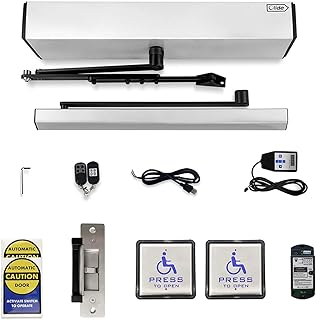
This commercial-oriented swing door operator is best for buyers who want both smart controls and a push-button option. The listed package includes a wireless handicap push button and receiver, and the button can be configured for wireless or wired use. The operator is described as working with Alexa and Google Assistant and supporting remote control through a phone app.
Like the other WiFi option, it is described as reopening when an object is detected in the closing path. The listing also notes that the door cannot be manually opened while the knob lock is closed; manual opening is available when the lock is open. Choose it if the flexible button connection matters. Avoid assuming the lock behavior will suit a doorway that must remain manually accessible while locked.
Olideauto DSW120 Swing Door Operator

The DSW120 is best for buyers who prefer activation by wireless fob key or exit button rather than relying on app or voice control. Its listed features include automatic swing-door activation, obstacle-triggered reopening, and adjustable operating parameters. A handheld programmer can be used to adjust settings such as manual push force and closing force.
The product details recommend an optional motion safety scanner for disabled access to extend the reopening time. Consider that recommendation when planning a safety setup; the scanner is not listed as included. Choose the DSW120 if fob or exit-button operation and parameter adjustment fit the intended doorway. Check the included components and any additional equipment needs before ordering.
Olideauto Automatic Dual Door Operator
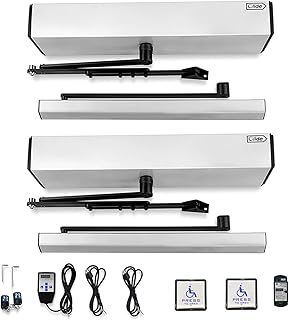
This model is best for an entry with two swinging doors that should open at the same time. The product description says one handicap push button can activate both doors. It includes a stainless steel push switch with wired and wireless operation, and the two opener units can be programmed one at a time with a handheld programmer.
Listed adjustable settings include hold-open time, closing force, and lock mode. The operator is also described as reopening when it detects an object in the closing path. The stated maximum loading weight is 264 pounds; confirm how that specification applies to the planned installation before buying. Choose this system for a paired-door configuration, not a standard single-door opening.
Olideauto Black Automatic Door Opener

This black operator is best for buyers looking for a straightforward setup with hardwired stainless steel handicap push buttons. Its listed features include adjustable manual push and closing force, plus settings that can be changed with a handheld programmer. The product description also says the door automatically reopens when an object is detected in the closing path.
Choose this option if hardwired button activation and adjustable settings meet the project requirements. Its supplied feature information does not mention WiFi, app control, voice control, or wireless button operation, so it may be a less suitable choice if those functions are essential. Confirm the package contents and door requirements with the seller before installation.
Buying Guide: How to Choose an Automatic Handicap Door Opener
What kind of door will the operator control?
Start by identifying whether the opening has one swinging door or a pair. The dual-door model is specifically described as opening two swing doors simultaneously. The other products are presented as swing door operators, but their listings do not provide a full sizing or installation compatibility chart. Verify door dimensions, weight, swing direction, and mounting conditions with the manufacturer or installer.
How should users activate the door?
Choose an activation method that fits the people and traffic using the entrance. Push buttons offer a direct option; the DSW120 lists fob keys and an exit button. The WiFi models add phone-app and compatible smart-speaker control. The dual-door and black models emphasize push-button operation. Check whether a button is wired, wireless, or both, and confirm what is included.
Which safety and adjustment features matter?
Several listings describe reopening when an object is detected in the closing path. This feature does not replace careful setup or site-specific safety planning. The DSW120 listing recommends an optional motion safety scanner for disabled access. Adjustable force and hold-open settings can also matter; check which controls are available on the specific model and how they are programmed.
What should buyers verify before installation?
- Confirm the operator is suitable for the particular door and intended traffic.
- Check whether the required push buttons, receiver, programmer, scanner, or other components are included.
- Review wired and wireless requirements, power needs, and any lock behavior.
- Consult a qualified door professional about installation and applicable accessibility and safety requirements.
Frequently Asked Questions
What is an automatic handicap door opener?
It is a powered door operator that opens a door after activation, commonly through a push button, fob, exit button, app, or voice control, depending on the model.
Do these products work with every door?
The product details do not establish universal compatibility. Confirm the door’s type, size, weight, swing, and mounting conditions before choosing an operator.
Can these openers be used manually?
Some listed models describe manual operation or adjustable manual push force. The WiFi operator with receiver notes that manual opening is unavailable while its knob lock is closed.
Do the models include a safety scanner?
The DSW120 listing describes an optional motion safety scanner recommendation, not an included scanner. Check each product’s package details for included safety devices.
Which model is intended for two doors?
The Olideauto Automatic Dual Door Operator is described as opening two swinging doors simultaneously from one handicap push button.