The best wall mount for an 82-inch TV depends on its weight, VESA pattern, wall construction, and desired range of motion. The five options below list screen-size support that includes 82 inches: choose a full-motion model for adjustable viewing, a tilting mount to reduce glare, or a fixed mount for a close-to-wall setup. Before buying, check your TV’s specifications against the mount’s limits.
| Mount | Best For | Listed TV Range |
|---|---|---|
| USX MOUNT Full Motion | Large TVs with adjustable viewing | 42–90 inches |
| USX MOUNT Dual Arm | Pull-out reach and broad compatibility | 37–84 inches |
| ECHOGEAR Tilting Mount | Simple tilt adjustment | 40–90 inches |
| Perlegear Ultra Slim | Low-profile look with full motion | 42–90 inches |
| USX STAR Fixed Mount | Fixed, close-to-wall installation | 37–86 inches |
USX MOUNT 42–90-Inch Full Motion Mount

Best for: People who want to swivel or tilt an 82-inch screen to suit different seats. The mount is listed for TVs from 42 to 90 inches, supports up to 132 pounds, and accepts VESA patterns from 200 × 100mm to 600 × 400mm.
Its dual articulating arms provide +5°/−15° tilt and up to ±45° swivel, depending on the TV. A ±3° post-installation adjustment helps level the screen. The listing includes instructions and labeled hardware, and specifies compatibility with wood studs spaced up to 16 inches.
Why it was selected: Its listed size and weight limits cover many 82-inch TVs, while the full-motion arms suit rooms where viewing positions vary. Limitation: Confirm the TV’s weight and VESA pattern; the maximum swivel angle can depend on the screen.
USX MOUNT 37–84-Inch Dual-Arm Mount

Best for: Buyers who want an 82-inch TV mount with pull-out reach. This model is listed for 37- to 84-inch TVs, supports up to 120 pounds, and fits VESA patterns from 200 × 100mm to 600 × 400mm. Its listed wood-stud range is 12 to 16 inches.
The arms extend up to 15.16 inches from the wall and retract to 2.74 inches. The mount offers +5°/−15° tilt, up to ±45° swivel, and ±4° post-installation leveling adjustment. The product description identifies compatibility with several major TV brands, but the TV’s own measurements remain the key fit check.
Why it was selected: Its extension and retraction range can help when a screen needs to move out from the wall for viewing. Limitation: The 120-pound capacity and 84-inch maximum are product limits, so verify your TV’s exact weight and size.
ECHOGEAR 40–90-Inch Tilting Mount

Best for: Viewers who want a large screen with tilt adjustment rather than articulating arms. The mount is listed for TVs up to 90 inches and 135 pounds, making its stated size range suitable for an 82-inch screen if the other fit requirements also match.
It tilts up to 10 degrees, which can help adjust the viewing angle and reduce glare. The manufacturer describes a three-step installation process and includes divided hardware and a drilling template.
Why it was selected: It offers a straightforward alternative to full-motion mounts for rooms where the TV does not need to swivel. Limitation: The listed feature is tilt only; the product details do not specify swivel or VESA compatibility, so confirm the mounting pattern and wall requirements before purchase.
Perlegear Ultra Slim Full Motion Mount

Best for: Buyers seeking a low-profile mount that still allows angle adjustment. It is listed for most 42- to 90-inch TVs, up to 132 pounds, and VESA patterns from 200 × 200mm to 600 × 400mm. Its wall plate accommodates wood studs spaced 16 to 24 inches apart.
The mount places the TV 1.1 inches from the wall when retracted, extends up to 15 inches, tilts +5°/−15°, and swivels up to ±45°. A ±3° adjustment helps fine-tune leveling. The listing says it can be installed on wood studs, concrete, or brick.
Why it was selected: It combines a slim retracted profile with full-motion adjustment and a wider listed stud-spacing range. Limitation: The product instructions say not to mount it on drywall alone; use an appropriate supporting wall structure.
USX STAR Fixed Low-Profile Mount
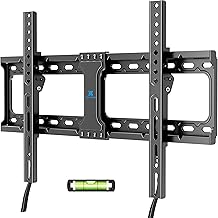
Best for: A stationary 82-inch TV installation where a close-to-wall position matters more than movement. The fixed mount is listed for 37- to 86-inch TVs weighing up to 132 pounds, with VESA patterns from 150 × 100mm to 600 × 400mm. It supports listed stud spacing of 16, 18, or 24 inches.
The screen sits 1.28 inches from the wall. Quick-disconnect pull straps are included to help release the TV from the mount.
Why it was selected: Its stated screen-size and weight limits include many 82-inch TVs, and its fixed design keeps the setup simple. Limitation: It does not provide the tilt or swivel adjustments offered by the full-motion options.
Buying Guide: How To Choose An 82-Inch TV Wall Mount
Will the mount fit my TV?
Check three specifications before choosing: screen size, TV weight without its stand, and VESA pattern. VESA is the spacing between the mounting holes on the back of the TV. Match all three to the mount’s listed limits; a suitable screen-size range alone does not confirm compatibility.
Should I choose fixed, tilting, or full motion?
- Fixed: Choose this style when the TV can stay in one position and a close-to-wall profile is the priority.
- Tilting: Choose it when you want to angle the screen vertically, such as to adjust glare or a higher mounting position.
- Full motion: Choose it when you need to swivel toward different seating areas or pull the TV away from the wall.
What wall and stud details should I check?
Confirm the listed stud spacing and wall material against your installation location. Product requirements differ: some models specify wood studs, while the Perlegear listing also names concrete and brick. Do not assume any mount can be attached to drywall alone. Follow the included installation instructions and use suitable hardware for the wall type.
How much weight capacity do I need?
Compare the TV’s weight with the mount’s stated capacity, leaving the mount within its specified limit. The options here list capacities from 120 to 135 pounds. Do not estimate by screen size; two TVs with the same diagonal measurement can have different weights.
Frequently Asked Questions
Can these mounts fit an 82-inch TV?
All five list screen-size ranges that include 82 inches. Verify the TV’s weight, VESA pattern, and wall installation requirements before selecting one.
Is full motion necessary for a large TV?
No. Full motion is useful when you need to swivel or extend the screen. A fixed or tilting mount may suit a viewing position that does not change.
What does VESA compatibility mean?
VESA compatibility refers to the spacing of the mounting holes on the TV. Measure or check the TV manual, then compare that pattern with the mount’s supported range.
Can I install a wall mount on drywall alone?
Do not assume it is safe. Follow the mount’s wall requirements and installation instructions. The Perlegear product listing specifically says not to mount on drywall alone.