The best sit-stand keyboard tray depends on whether you need a full height-adjustable platform, a simple desktop riser, or an under-desk drawer that frees up workspace. The Mount-It! full-motion tray is best for changing typing height while seated or standing; the 3M tray adds tilt adjustment and a wrist rest; and the Mount-It! standing riser offers a broad height range without installation. The AX WABER model is better for desk space, while VIVO provides preset desktop heights.
| Product | Best For | Adjustment Style |
|---|---|---|
| Mount-It! Full Motion Tray | Switching between seated and standing typing | Under-desk height adjustment |
| 3M Easy Adjust Tray | Height, tilt, and wrist-rest adjustment | Lift arm and tilt |
| VIVO DESK-V024A | Preset-height desktop typing | Five scissor-lift settings |
| AX WABER Pull-Out Tray | Saving desktop space | Slide-out, C-clamp mounted |
| Mount-It! Standing Riser | Seated or standing use without assembly | Desktop height adjustment |
Mount-It! Full-Motion Under-Desk Tray

Best for: People who want to adjust keyboard height for both seated and standing work without moving other desk items. Its stated adjustment range runs from 4.7 inches below the desktop to 8.7 inches above it, a total range of 13.4 inches.
The tray mounts beneath a desk with a steel bracket and included screws. The listed mounting requirements are wood or MDF desktops at least 0.6 inches thick. Mounting hardware and a step-by-step video guide are included, and the product features a wrist rest.
Limitation: It is not listed for glass, metal, or crossbar desks. Choose this model if your desk meets the stated surface requirements and you want a bolted installation; avoid it if you need a clamp-on tray.
3M Sit/Stand Easy Adjust Tray

Best for: Buyers who want to adjust both platform height and typing angle. The lift arm adjusts 10 inches above to 4 inches below the mounting surface, and the platform tilts from +10 degrees to -15 degrees.
The keyboard and mouse platforms are adjustable, and the package includes a leatherette-covered gel wrist rest and a Precise Mouse Pad that can be positioned on the right or left. These details make it a useful option when mouse placement and wrist support are part of the setup.
Limitation: Its stated vertical range is measured from the mounting surface, so compare that range with your desk and preferred typing heights before choosing it.
VIVO 24-Inch Keyboard And Mouse Riser
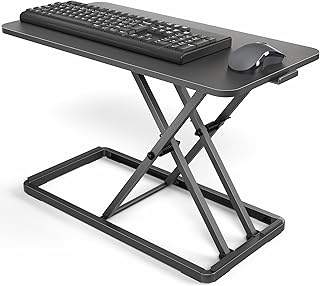
Best for: Users who want to raise a keyboard and mouse together on top of the desk. Its 23.6-by-11.8-inch platform supports up to 11 pounds, and the scissor-lift mechanism offers five preset heights: 8.5, 10.4, 12, 14.4, and 15.6 inches.
A squeeze handle operates the lift, making this a straightforward choice for a standing workstation with a preferred preset height. It is better for buyers who want a desktop riser than for those seeking an under-desk pull-out tray.
Limitation: It has five listed height settings rather than a continuously adjustable range. Check that one of those positions suits your desk and working posture.
AX WABER Under-Desk Pull-Out Tray

Best for: People who want to move their keyboard and mouse below the desktop when not in use. The listed platform is 27.3 inches long and 8.3 inches deep; the total clamp-to-clamp length is 32.5 inches. It slides out up to 5.7 inches from the desk edge.
The C-clamps attach without drilling and accommodate desk surfaces up to 1.9 inches thick. This is a practical space-saving choice for a workstation where keeping the main desktop clear matters more than raising the keyboard for standing work.
Limitation: Measure the desk before buying: the full clamp-to-clamp span is 32.5 inches, and the desk surface must not exceed the stated 1.9-inch thickness limit.
Mount-It! Standing Keyboard Riser

Best for: Buyers who need a desktop riser that can work at seated and standing heights. Its stated range is 1.7 to 15.6 inches, and the 23.6-by-11.8-inch platform supports up to 11 pounds. The platform can hold a full-size keyboard and mouse side by side or a laptop up to 15.6 inches.
The riser arrives ready to use with no assembly required. Its low starting height distinguishes it from desktop risers that begin several inches above the desk, so it may suit seated typing as well as standing work.
Limitation: This sits on the desktop rather than attaching underneath it. Choose another style if preserving clear desktop space is your main priority.
Buying Guide: How To Choose A Sit-Stand Keyboard Tray
Do you need an under-desk tray or a desktop riser?
An under-desk model can keep the keyboard out of the way and leave more room on the desktop. A desktop riser is easier to set up in some workspaces and places the keyboard on a raised platform, but it occupies desk surface. The AX WABER is a slide-out option; the VIVO and Mount-It! standing riser sit on top of the desk.
How much height adjustment do you need?
Compare the product’s actual adjustment range with your seated and standing typing positions. The Mount-It! full-motion tray specifies movement both below and above the desktop. The 3M tray lists height relative to its mounting surface, while VIVO uses five preset heights. A large range is useful only if the platform can reach a comfortable position for your setup.
Will the mounting method fit your desk?
Check desk thickness, underside clearance, and the space available for clamps or brackets. The Mount-It! under-desk model specifies wood or MDF at least 0.6 inches thick and excludes glass, metal, and crossbar desks. AX WABER uses C-clamps and specifies a maximum desk thickness of 1.9 inches and a 32.5-inch overall clamp span.
What platform size and support details matter?
Make sure the surface can hold the keyboard and mouse arrangement you use. The VIVO and Mount-It! standing riser list 23.6-by-11.8-inch platforms and an 11-pound limit. Consider tilt adjustment, mouse placement, and wrist support as separate features; the 3M listing specifies tilt and a repositionable mouse pad, while the Mount-It! under-desk listing includes a wrist rest.
Frequently Asked Questions
Can a keyboard tray work for both sitting and standing?
Yes. Choose a model with an adjustment range that reaches your preferred typing position while seated and standing. Check the listed range and how it is measured.
Does every sit-stand keyboard tray mount under a desk?
No. Under-desk trays attach below the surface, while desktop risers sit on top. The VIVO and Mount-It! standing riser are desktop models.
What should I measure before buying an under-desk tray?
Measure the available width, desk thickness, and underside clearance. For clamp-mounted models, also check the full clamp-to-clamp span.
Is a preset-height riser adjustable?
Yes, but it adjusts among fixed positions rather than continuously. The VIVO riser lists five height settings.
Which features can help with typing comfort?
Height adjustment, platform tilt, a suitable mouse position, and wrist support can all matter. Compare the specific listed features with your preferred typing posture.