Door knobs with codes let household members enter without carrying a traditional key. The best choice depends on how many codes you need, whether you want fingerprint or app access, and what backup entry options matter. Yamiry is best for simple code access with a one-time guest code; iulock suits households needing many customizable codes; the biometric lock adds fingerprint and IC card entry; Kucacci offers app-based features; and Signstek is a straightforward keypad option with mute and passage functions.
| Product | Best For | Notable Access Options |
|---|---|---|
| Yamiry Keypad Smart Door Knob | Families and temporary guests | Codes and mechanical key |
| Fingerprint Biometric Door Knob | Multiple access methods | Fingerprint, password, IC card, keys |
| iulock Keypad & Key Lock | Many users and adjustable settings | Up to 50 codes and keys |
| Kucacci Smart Door Lock | App and remote-access features | Fingerprint, PIN, app, fob, keys |
| Signstek Keypad Door Lock | Simple code entry and quiet operation | Codes, mute mode, emergency power |
Yamiry Keypad Smart Door Knob

The Yamiry lock is best for buyers who want keypad entry without relying on an app or fingerprint reader. Its backlit keypad accepts 4–8 digit codes, and the lock can store up to 20 codes for family members. A one-time code gives guests temporary access, while a duplicable mechanical key provides another entry method.
The listed features include an aluminum-alloy construction, a low-battery indicator, an anti-prying user code feature, and IP54 weather resistance. Installation is described as requiring a screwdriver and taking less than 15 minutes. Choose this model if shared household codes and guest access are priorities.
Limitation: Access is centered on keypad codes and a mechanical key; fingerprint and app controls are not listed.
Fingerprint Biometric Door Knob
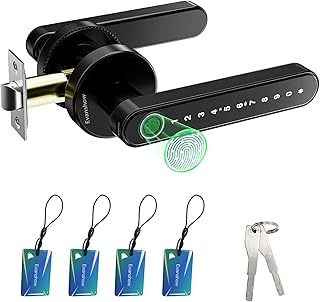
This biometric lock is best for buyers who want more than one way to unlock a door. The listed 4-in-1 setup supports fingerprint, password, two mechanical keys, and four IC cards. It can store up to 100 fingerprints and 50 passwords, making it a better fit for households or shared spaces with numerous users.
The product listing says its sensor recognizes fingerprints in less than a second. It also includes a USB port for emergency power from an external power bank. Before first use, an administrator fingerprint must be registered. Until that setup is complete, the listing warns that any fingerprint can unlock the door.
Limitation: Admin setup is essential before use, and the USB port does not charge the lock’s internal batteries.
iulock Keypad & Key Smart Lock

The iulock is best for buyers who need to create codes for multiple family members, staff, or guests. It supports up to 50 customizable codes, each from 1 to 15 digits, and includes two mechanical keys. The backlit keypad is designed for use in low light, while passage mode lets users keep the door unlocked when needed.
Other listed features include silent mode, a detachable silicone grip, a waterproof design, and a low-battery alarm. The lock uses four AAA batteries, with a listed battery life of up to 18 months, and includes Type-C USB backup for when the batteries run out. Choose it if code capacity and operating modes matter more than connected app functions.
Limitation: The listing describes keypad and key entry, not app or biometric access.
Kucacci Smart Door Lock With Handle

Kucacci is best for buyers who want keypad codes alongside connected access methods. Its listed options include fingerprint, PIN code, smartphone app, key fob, and mechanical key. The app can authorize access for family or friends and generate one-time or permanent codes. The product also lists access tracking and an auto-lock feature.
Installation is described as a DIY process using a screwdriver, with a reversible handle for left- or right-opening doors. Alexa voice control and remote unlocking require a Wi-Fi Gateway, according to the listing. Choose this model if app-managed access is useful, and check which optional equipment is needed for the features you plan to use.
Limitation: Alexa voice control and remote unlocking are not standalone features; the listed Wi-Fi Gateway is required.
Signstek Keypad Door Lock

The Signstek is best for buyers seeking keypad code entry with a few practical operating features. Its listing highlights multiple access codes, mute mode, and passage function. Mute mode turns off keypad beeps, while passage function is intended for times when automatic locking is not wanted. The product is described as waterproof and includes an emergency power supply for a battery outage.
The listing identifies possible uses including entry doors, garages, utility rooms, back doors, and bedrooms. It also recommends using the inside knob indoors. Choose this model if quiet keypad operation and a passage setting are more important than smart-home or biometric options.
Limitation: The supplied product details do not specify the number or length of supported codes.
Buying Guide: How to Choose a Door Knob With Codes
How many codes do you need?
Check the maximum number of user codes before choosing a lock. Yamiry lists 20 codes, while iulock supports up to 50. The biometric model lists 50 passwords as well as fingerprint and card capacity. A higher capacity can be useful for shared homes or offices, but consider whether you need individual codes or just a few household entries.
Do you want keypad-only or multiple access methods?
A keypad-only setup is simple to understand and may be sufficient for family and guest access. For alternatives, compare products that list mechanical keys, fingerprint recognition, IC cards, key fobs, or smartphone apps. Backup entry matters: check whether the lock uses a physical key or offers emergency power, and understand the stated limitations of each backup method.
Which features affect everyday use?
Backlit keys help with nighttime entry; mute mode reduces keypad sounds; and passage mode can keep a door unlocked when appropriate. Auto-lock may suit buyers who want the door to relock without manually turning a lock, while one-time codes can be useful for temporary visitors. These features vary by model, so confirm that the specific function you need is listed.
Will installation and setup fit your door?
Compare the manufacturer’s installation description with your door and existing hardware before ordering. The supplied product information describes screwdriver installation for several models, but it does not provide every door measurement or fit requirement. Review the complete product specifications for your door type and dimensions. For locks with app or fingerprint access, follow the required setup steps before relying on them.
Frequently Asked Questions
Can door knobs with codes still use a regular key?
Some can. Yamiry, the biometric model, and iulock list mechanical keys. Check each product’s features rather than assuming every keypad lock includes one.
Are all keypad door knobs connected to a phone?
No. App access is listed for Kucacci, while the other products here emphasize keypad, key, fingerprint, or card access. Kucacci requires a Wi-Fi Gateway for remote unlocking and Alexa voice control.
What happens if the batteries run out?
Backup options depend on the model. The listed products include mechanical keys, emergency power, or USB backup in different combinations. Check the specific lock’s instructions and keep its backup method accessible.
Can I give a guest temporary access?
Yamiry lists one-time codes, and Kucacci lists one-time code generation through its app. Other models may support multiple codes, but the supplied details do not establish that those codes can be set to expire.
Is a fingerprint lock ready to use immediately?
Not necessarily. The biometric model requires administrator fingerprint registration before first use. Its listing warns that any fingerprint can unlock the door until an administrator is set.