Answer: If you want hands-free access and strong security, a touchscreen door lock is a smart upgrade for any main entry. These devices combine fingerprint or keypad entry with Bluetooth or WiFi control, ideal for homeowners, renters, and small offices seeking keyless convenience. The top picks below are selected for reliability, ease of use, and integration with smart ecosystems. The list highlights who each lock is best for, from tech-savvy households to rental properties needing remote management.
Summary of chosen products
| Product | Best For | Why It Stands Out |
|---|---|---|
| DESLOC B200 Fingerprint Smart Lock | Smart homes and families | Bluetooth access, fingerprint, remote sharing, and easy user management |
| Schlage Encode Plus Smart WiFi Deadbolt | Apple ecosystem users | Tap to unlock, Apple Watch unlock, and HomeKit/Airbnb compatibility |
| OLUMAT Keyless Entry Fingerprint Lock | Rentals and small offices | 8-in-1 entry options with keypad and fingerprint |
| TEEHO TE019 Smart Keypad Door Lock | Rentals and front doors | Auto-lock, weatherproof design, and simple installation |
| Veise VE017 Fingerprint Smart Door Lock | Front doors and USB-C powered setups | 8-in-1 entry and comprehensive user management |
DESLOC B200 Fingerprint Smart Lock
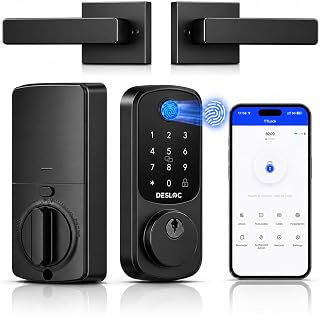
The DESLOC B200 combines a fingerprint reader with a touchscreen keypad and Bluetooth app control. It supports unlock via fingerprint, keypad, fob, or smartphone access, and includes remote access sharing and user management. Best for tech-forward households that want flexible entry methods and easy guest access. The lock also features auto-lock and low battery alerts for ongoing security. A potential limitation is the need for regular battery maintenance to ensure uninterrupted operation in areas with weak Bluetooth signal.
Schlage Encode Plus

Best for Apple users and smart homes that rely on HomeKit, Watch unlock, and seamless Airbnb hosting. It provides easy tap-to-unlock and robust integration with Apple devices. A notable limitation is dependency on a stable WiFi connection for some smart features and remote access. Suitable for modern entries where keyless convenience and energy efficiency are priorities.
OLUMAT Keyless Entry

Best for rentals and small offices needing reliable 8-in-1 entry options. It supports fingerprint, keypad, and app control. Choose this if you want a flexible mix of access modes and straightforward installation. A limitation to consider is the potential complexity of setup for first-time users and ensuring compatibility with existing door hardware.
TEEHO TE019 Smart Keypad

Best for rentals and front doors needing straightforward installation and reliable auto-lock. The TE019 offers app access and keypad entry with ANSI Grade 3 security features. Choose this if you want a durable, weather-resistant lock with simple setup. Caution: performance can vary with extreme weather and battery life varies with usage intensity.
Veise VE017 Fingerprint Smart Lock

The Veise VE017 provides 8-in-1 entry options, including fingerprint, keypad, and app control. It emphasizes smart user management and auto-lock, with a USB-C port for power. Best for homes needing multiple access methods and remote control. A potential limitation is that some users may require guidance for initial setup of user permissions and app pairing.
Buying Guide: Key Purchase Considerations
- Access Methods: Decide whether you need fingerprint, keypad, fob, app, or a combination. For families with children or guests, a versatile mix improves usability.
- Smart Home Integration: Check compatibility with your ecosystem (Apple HomeKit, Google Home, Alexa). If you rely on Apple devices, encode-capable locks may streamline unlocking.
- Connectivity: Bluetooth provides local control; WiFi or hub-based systems enable remote access and sharing. Consider whether you want remote entry for guests or service providers.
- Security Features: Look for auto-lock, tamper alerts, and low-battery notifications. Some models offer temporary or scheduled access for rentals or short-term stays.
- Installation and Fit: Ensure the lock fits your door thickness and existing bore hole configuration. Some locks are easier to install on standard doors, while others may require professional help.
- Durability: Weatherproof and ANSI/UL ratings can be important for exterior doors. Consider IP ratings if you face harsh conditions.
- Power Source: Battery-powered locks require occasional replacement; USB-C or rechargeable options can reduce maintenance.
Frequently Asked Questions
- Do touchscreen door locks require WiFi to work? Some models operate via Bluetooth or local keypad without WiFi, but remote access usually requires an internet connection.
- Can these locks be installed on any exterior door? Most are designed for standard exterior doors but check door thickness, bore hole size, and latch compatibility for your model.
- Are fingerprint sensors reliable in cold or humid climates? Environmental conditions can affect sensor performance; many models include weather-resistant housings, but performance may vary with moisture and temperature.
- Is it safe to share temporary access with guests? Many locks support time-limited codes or guest access via apps, enabling control without giving permanent keys or codes.
- Do these locks work if the power runs out? Battery-powered models will fail without power unless they include an external power option, such as USB or a mechanical key fallback.
- What maintenance is required? Periodic battery replacement, firmware updates, and sensor cleaning help maintain reliability and security.