To achieve a neat, adjustable projection setup, choose universal projector screen mounting brackets that provide reliable support, adjustable extension, and compatibility with most screens. The five selections below are suitable for wall or ceiling mounting, with extensions ranging from 6 to 12 inches and weight capacities up to 80 pounds. They’re ideal for home theaters, classrooms, and small offices. This guide highlights who each product is best for and why it stands out.
| Product | Extension | Weight Capacity | Best For |
|---|---|---|---|
| WALI Universal PSM001-W | 6 in | 66 lbs | Medium screens, wall or ceiling installs |
| XINLEI PRL003W | 6 in | 66 lbs | Versatile mounting on multiple wall types |
| WALI PSM001XL-W | 12 in | 80 lbs | Larger screens needing extra clearance |
| PUTORSEN B0FRGC17QR | 6 in | 66 lbs | Clean, compact installations |
| POROHOM 80 lb | 6 in | 80 lbs | Safer mounting with carabiner design |
WALI Universal Projector Screen Ceiling Mount (PSM001-W)

Best for mid-size screens in home theaters or classrooms where a compact, sturdy 6-inch extension is sufficient. This white L-bracket set supports up to 66 lbs and keeps the screen at a comfortable distance from the wall to minimize keystone distortion. The design helps clear corner furniture or chalkboards while preserving a clean look.
Best-for note: Ideal for rooms with standard wall materials and light-to-moderate screens. The 6-inch extension provides adequate clearance for most ceilings or walls without creating bulk.
Caution: Ensure wall anchors match the wall type (studs, concrete, etc.). Incorrect hardware may compromise safety.
XINLEI Universal Projector Screen Wall Mount L-Brackets (PRL003W)

Best for versatile mounting on wood studs, concrete, brick, or drywall. Features a carabiner to secure the screen and a 6-inch adjustable extension, making it suitable for rooms with varied furniture layouts. Supports up to 66 lbs.
Better for: installations with mixed wall types or when extra screen stability is needed. The carabiner adds an extra layer of safety against accidental screen release.
Caution: Verify wall structure before mounting; heavier screens require precise anchoring to prevent movement over time.
WALI Universal Projector Screen Ceiling Mount (PSM001XL-W)

Best for larger screens or rooms that require substantial clearance. The 12-inch extension increases the distance from wall, reducing keystone effects and allowing for ceiling or wall installers to work around furniture. It supports up to 80 lbs with durable steel construction.
Choose this if you need extra room between the screen and wall or ceiling. Heavy or tall screens benefit from the additional reach.
Caution: Longer arms can introduce more leverage; ensure the mounting surface is robust and properly anchored to handle the load.
PUTORSEN Universal Projector Screen Ceiling Mount (6 Inch, White)
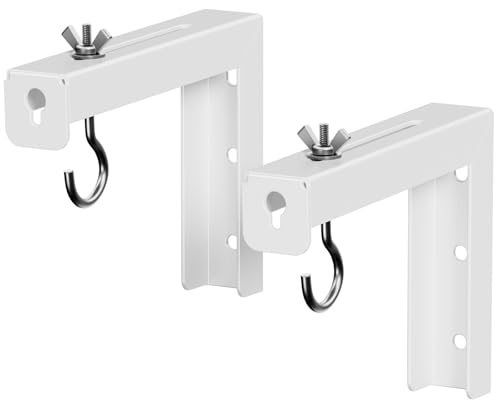
Best for clean, minimal installations where space is limited. This white six-inch L-bracket provides reliable support up to 66 lbs and includes an adjustable 1.5 to 5 inch wall distance to optimize placement. Suitable for both home theaters and small office setups.
Limitation: Installation requires precise alignment; small misalignments can affect screen leveling and image symmetry.
POROHOM Black Universal Projector Screen L-Bracket (6 Inch)

Best for safer mounting with a carabiner-based design that helps prevent the screen from falling off. The 6-inch bracket supports up to 80 lbs, making it suitable for heavier screens or environments with frequent use. It supports both wall and ceiling mounting and allows adjustable spacing for proper placement.
Better for: installations prioritizing safety and a lower profile look. The carabiner system helps anchor the screen securely.
Caution: Ensure hardware compatibility with ceiling or wall materials to avoid looseness over time.
Buying Guide: Key Purchase Considerations
- Extension range: Decide between 6-inch minimal clearance and 12-inch extra reach based on room layout and furniture placement.
- Weight capacity: Choose brackets rated for the screen weight plus any mounting hardware. Exceeding the rating increases risk of failure.
- Wall or ceiling type: Consider studs, concrete, brick, or drywall when selecting anchors and hardware. Some products include carabiners for added safety.
- Material and durability: Steel brackets provide solid support and long-term reliability; ensure powder-coated finishes match your room aesthetics.
- Ease of installation: Look for adjustable hooks and straightforward mounting kits that minimize alignment challenges.
- Compatibility: Most universal brackets fit standard screen sizes, but verify mounting hole patterns and screw sizes if available.
Frequently Asked Questions
- What is the typical weight these brackets can support? Most options cover 66 to 80 lbs, which suits standard home theater screens.
- Do these brackets work with ceiling installations? Yes, all listed products support wall or ceiling mounting.
- Is adjustable distance important for keystone correction? Yes; proper distance helps minimize keystone effects and improves image alignment.
- Can I install these on concrete walls? Some models include hardware suitable for concrete or brick walls; verify the included mounting kit.
- Should I hire a professional for installation? If you’re unfamiliar with wall anchors or ceiling mounts, professional installation can reduce safety risks.