Looking for a tilt-down TV mount that saves space and reduces glare? This guide compares five top tilting and low-profile mounts ideal for living rooms, bedrooms, or home theaters. Each option is suited for different TV sizes, stud configurations, and mounting goals. Use the quick table below to compare key specs at a glance, then read detailed sections to find the right pick for your setup.
| Product | TV Range | Max Weight | VESA | Best For |
|---|---|---|---|---|
| Mounting Dream MD2268-LK | 37-90″ | 132 lbs | 600×400 mm | Slim, low-profile look; 8° tilt |
| PERLESMITH Tilting Bracket | 23-60″ | 115 lbs | 400×400 mm | Compact for medium TVs |
| USX MOUNT Low Profile Tilt | 26-60″ | 99 lbs | 400×400 mm | Budget-friendly, easy tilt |
| Pipishell Full Motion for 13-43″ | 13-43″ | 44 lbs | 200×200 mm | Small setups and monitors |
| Mounting Dream MD2380 Full Motion | 32-70″ | 110 lbs | 400×400 mm | Dual-arm articulating motion |
Mounting Dream Tilting Mount MD2268-LK
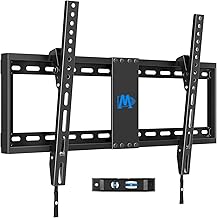
The MD2268-LK tilting wall mount is designed for 37-90 inch TVs and supports up to 132 pounds with a Max VESA of 600×400 mm. Its low-profile design places the screen about 1.5 inches from the wall, optimizing space in smaller rooms. The tilt function allows up to 8 degrees forward tilt to reduce screen glare. Suitable for 16-, 18-, or 24-inch stud spacing, it fits common residential walls. A quick-lock and release feature improves installation and adjustments. Best for homeowners seeking a robust, space-saving tilt option for large TVs.
Who it’s best for: someone who needs a strong, wall-hugging mount for large TVs and wants glare reduction and easy tilt adjustments. Why selected: high weight capacity and wide VESA support cover most 37- to 90-inch models, with a slim profile. Caution: verify stud spacing in your wall and ensure clearance behind the TV for tilt range and cable routing.
PERLESMITH Tilting Wall Mount for 23-60″

The PERLESMITH tilting mount supports most 23-60 inch TVs with up to 115 pounds weight capacity and a Max VESA of 400×400 mm. It’s a low-profile option that keeps the screen close to the wall while offering tilt to reduce glare. Best for mid-sized TVs in apartments or bedrooms where a slim mount with tilt is preferred. Choose this if you need a reliable mid-range tilt with straightforward installation. Limitation: lower weight capacity than larger mounts, not ideal for very large displays above 60 inches.
USX MOUNT Low Profile Tilt Mount

USX MOUNT offers a low-profile tilt solution for 26-60 inch TVs up to 99 pounds with tilt angles of 0° to -8°. It supports VESA 400×400 mm and fits 12″ or 16″ wood studs, concrete, or brick. Best for users who want a simple, budget-friendly tilt that covers common mid-size TVs and frequently rearranged rooms. Choose this for quick installation and flexibility. Caution: tilt range is modest; if you need more tilt, consider a full-motion option.
Pipishell Full Motion Mount for Small TVs

Pipishell’s approach targets smaller TVs and monitors, with a 13-43 inch range and up to 44 pounds. It features full motion, including rotation, tilt, and extension, suitable for desks, corners, or rooms where flexible viewing angles are required. Best for secondary TVs, kitchens, or compact spaces. Limitation: lower weight and screen size range may exclude larger living-room TVs; verify compatibility with your display.
Mounting Dream MD2380 Full Motion Mount

The MD2380 provides full motion for 32-70 inch TVs up to 110 pounds, including swiveling and tilting with dual articulating arms. It fits 16-inch studs and supports a Max VESA of 400×400 mm. Best for larger main TVs where versatile positioning is valuable, such as living rooms with multiple seating areas. Choose this if you need wide reach and a robust articulating range. Caution: ensure proper wall clearance for full extension to avoid hitting furniture or walls.
Buying Guide
What should you consider when choosing a tilt-down wall mount?
- Screen size and weight compatibility: Match the TV’s size and mass to the mount’s rated load and VESA pattern.
- Stud configuration and wall type: Confirm stud spacing (12″ or 16″) and whether your wall is wood, concrete, or brick to select the correct installation hardware.
- Tilt range and low-profile design: If glare is a concern, a larger tilt may help; if space is tight, a low-profile mount maximizes room aesthetics.
- Installation complexity: Quick-lock features and straightforward leveling help reduce setup time and errors.
- Adequate clearance for cables: Ensure sufficient room behind the TV for power, HDMI, and AV cables, especially when tilting or extending.
- Future-proofing: Consider a mount with a broader VESA range or wider tilt/shift to accommodate potential TV upgrades.
Frequently Asked Questions
- What does tilt range mean, and why is it important?
– Tilt range indicates how far the screen can tilt forward or backward. A greater tilt helps reduce glare and improve viewing angles in bright rooms. - Can I use a tilt mount for a very large TV?
– Yes, provided the mount’s weight capacity and VESA pattern match your TV. Always confirm maximum TV size and weight. - Is it better to choose a full-motion mount over a tilt-only mount?
– Full-motion mounts offer swivel and extension for flexible seating positions, but they are often bulkier and pricier. Tilt-only mounts save space and are simpler. - What is VESA, and why does it matter?
– VESA is the standard mounting hole pattern on the back of TVs. Matching VESA ensures the mount fits securely. - How do I know if my wall can support a heavy TV mount?
– Check wall type, stud layout, and the wall’s ability to carry the TV’s weight. Consider professional installation if uncertain. - Are there safety tips for mounting a TV?
– Always use a wall mount rated for your TV, secure to wall studs, and verify the mount’s anchor hardware with your wall type.